2nd objective;
we can either use re-distrubtion, like re-distributing a static route, but then you might have other routes you do not wish to advertise so you have to filter ... turns abit of a headache (no default-information orginate command like OSPF :0( )
likewise you could create a static 0.0.0.0 0.0.0.0 <next hop> and then put this into EIGRP via network 0.0.0.0, BUT this will advertise all networks!!! BE CAREFUL WITH THAT COMMAND
IP DEFAULT NETWORK
BB-Router(config)#ip default-network 192.168.1.0
BB-Router#show ip route
S* 192.168.1.0/24 is directly connected, Null0
* - candidate default,
lets jump over and have alook at one of the other neighbours;
R3# show ip route
Gateway of last resort is 10.1.34.1 to network 192.168.1.0
D* 192.168.1.0/24 [90/10511872] via 10.1.34.1, 00:04:03, Serial1/0
COOLIO, mission accomplished (not as kool as OSPF, but hey!)
... ONE THING TO NOTE! the network for this command HAS to be classful!?!?! ... so for this route it was okay as this was a class C network, but say we wanted a default route for one of the loopbacks ... 172.32.8.0/24, we would have to use a /16 - WEIRD?!?!? .. dont like this command!
Sunday, 13 November 2011


Saturday, 12 November 2011
THE EIGRP LAB

Right, I have setup a new lab (seperate from my current lab) I have setup the lab as per Jeremys instructions, just IP addressing done so far ....
NOW lets get some ROUTING sorted!
NOTES
The network command has 2 functions
1) send hello's on any 172.30.0.0 interface
2) advertise the network
lets get EIGRP up and running on this backbone router;
BB-Router(config)#router eigrp 90
BB-Router(config-router)#network 172.30.0.0 0.0.255.255
BB-Router(config-router)#network 10.1.0.0 0.0.255.255
BB-Router(config-router)#no auto-summary
you kinda expect some magic or something right about now, but remember we have no neighbours yet :0(
BUT we can confirm that EIGRP is now running on the router;
BB-Router#show ip protocols
Routing Protocol is "eigrp 90"
Outgoing update filter list for all interfaces is not set
Incoming update filter list for all interfaces is not set
Default networks flagged in outgoing updates
Default networks accepted from incoming updates
EIGRP metric weight K1=1, K2=0, K3=1, K4=0, K5=0
EIGRP maximum hopcount 100
EIGRP maximum metric variance 1
Redistributing: eigrp 90
Automatic network summarization is not in effect
Maximum path: 4
Routing for Networks:
10.1.0.0/16 <----- shows /16 not /8 as not using default mask, tar no auto-summary
172.30.0.0 <----- This is default mask, it does not have to put /16
Routing Information Sources:
Gateway Distance Last Update
(this router) 90 00:03:51
Distance: internal 90 external 170
You will notice from the output our friends the K weights (the metric);
EIGRP metric weight K1=1, K2=0, K3=1, K4=0, K5=0
And look which ones we have, K1 and K3, Bandwidth and Delay - we know all about them :0)
Lets telnet over and get R2 EIGRP'd up;
R2(config)#router eigrp 90
R2(config-router)#no auto-summary
R2(config-router)#network 10.1.2.2 0.0.0.0
R2(config-router)#network 10.1.24.2 0.0.0.0
R2(config-router)#network 10.1.25.2 0.0.0.0
Always love seeing this notification;
01:05:24: %DUAL-5-NBRCHANGE: IP-EIGRP 90: Neighbor 10.1.24.2 (Serial0/0) is up: new adjacency network
10.1.25.2
Lets check out the neighbour relationships;
R2#show ip eigrp neighbours
IP-EIGRP neighbors for process 90
H Address Interface Hold Uptime SRTT RTO Q Seq Type
(sec) (ms) Cnt Num
0 10.1.24.1 Se0/0 13 00:06:43 474 2844 0 2
The H = At the beginning of the column stands for Handle, this is the order that it learnt the neighbours in, works from 0 being first, upwards ---->
Hold Time = This is the amount of time the router will wait till it considers it neighbour dead,
On a fast network (NBMA, T1 or greater) the Hold time is 15 seconds, bear in mind a HELLO is sent every 5 seconds, so if it misses 3 HELLO's that neighbour is considered dead, typically that HOLD time will not go below 10 seconds, if it does there could be some issues along the link which is causing it to miss a hello etc
Lets see;
R2#show ip eigr ne
IP-EIGRP neighbors for process 90
H Address Interface Hold Uptime SRTT RTO Q Seq Type
(sec) (ms) Cnt Num
0 10.1.24.1 Se0/0 11 00:06:45 474 2844 0 2
R2#show ip eigr ne
IP-EIGRP neighbors for process 90
H Address Interface Hold Uptime SRTT RTO Q Seq Type
(sec) (ms) Cnt Num
0 10.1.24.1 Se0/0 14 00:06:46 474 2844 0 2
Arh yes, we can see the 2nd time i ran it the Hold time went back up to 14 secs as it recieved an HELLO from the neighbour
SRTT = Source Round Trip Timer, how long did it take to get there and back from its neighbour (uses to this gauge how long it should wait to hear back from an UPDATE msg
RTO = Re Transmit Timeout, how long will it wait before it retransmits a msg
Q = How many packets are waiting in queue, sitting for neighbour (EIGRP msgs) should NEVER queue, if you see it go above zero, probably could be some bandwidth issues (routing protocols should send these as soon as they have it)
Seq Type = version of the EIGRP database
Lets check our routing table;
R2#show ip route
172.30.0.0/24 is subnetted, 9 subnets
D 172.30.2.0 [90/20640000] via 10.1.24.1, 00:28:06, Serial0/0
D 172.30.3.0 [90/20640000] via 10.1.24.1, 00:28:06, Serial0/0
D 172.30.0.0 [90/20640000] via 10.1.24.1, 00:28:06, Serial0/0
D 172.30.1.0 [90/20640000] via 10.1.24.1, 00:28:06, Serial0/0
D 172.30.6.0 [90/20640000] via 10.1.24.1, 00:28:06, Serial0/0
D 172.30.7.0 [90/20640000] via 10.1.24.1, 00:28:06, Serial0/0
D 172.30.4.0 [90/20640000] via 10.1.24.1, 00:28:06, Serial0/0
D 172.30.5.0 [90/20640000] via 10.1.24.1, 00:28:06, Serial0/0
D 172.30.8.0 [90/20640000] via 10.1.24.1, 00:28:06, Serial0/0
10.0.0.0/8 is variably subnetted, 5 subnets, 3 masks
C 10.1.2.0/24 is directly connected, Ethernet0/0
C 10.1.25.0/24 is directly connected, Loopback2
C 10.1.24.0/30 is directly connected, Serial0/0
D 10.1.34.0/30 [90/21024000] via 10.1.24.1, 00:28:07, Serial0/0
awesome! lets jump over to R3;
R3(config)#router eigrp 90
R3(config-router)#no auto-summary
R3(config-router)#network 10.1.2.3 0.0.0.0
R3(config-router)#network 10.1.34.2 0.0.0.0
Looking good;
R3#show ip eigrp neighbours
IP-EIGRP neighbors for process 90
H Address Interface Hold Uptime SRTT RTO Q Seq Type
(sec) (ms) Cnt Num
1 10.1.34.1 Se1/0 11 00:00:16 706 4236 0 4
0 10.1.2.2 Fa0/0 14 00:00:24 467 2802 0 8
Lets hop back to the back bone router and checking the routes;
BB-Router#show ip route
172.30.0.0/24 is subnetted, 9 subnets
C 172.30.2.0 is directly connected, Loopback2
C 172.30.3.0 is directly connected, Loopback3
C 172.30.0.0 is directly connected, Loopback0
C 172.30.1.0 is directly connected, Loopback1
C 172.30.6.0 is directly connected, Loopback6
C 172.30.7.0 is directly connected, Loopback7
C 172.30.4.0 is directly connected, Loopback4
C 172.30.5.0 is directly connected, Loopback5
C 172.30.8.0 is directly connected, Loopback8
10.0.0.0/8 is variably subnetted, 5 subnets, 3 masks
D 10.1.2.0/24 [90/10514432] via 10.1.34.2, 00:04:31, Serial0/1
D 10.1.25.0/24 [90/10642432] via 10.1.34.2, 00:04:31, Serial0/1
C 10.1.24.0/30 is directly connected, Serial0/0
C 10.1.34.0/30 is directly connected, Serial0/1
awesome, now as we would expect we are seeing the routes in the routing table favoring the higher bandwidth link to R3 (10.1.34.2/out Serial0/1);
BB-Router# show int serial0/1
Serial0/1 is up, line protocol is up
Hardware is QUICC Serial
Internet address is 10.1.34.1/30
MTU 1500 bytes, BW 256 Kbit, DLY 20000 usec, <---- 256kbit
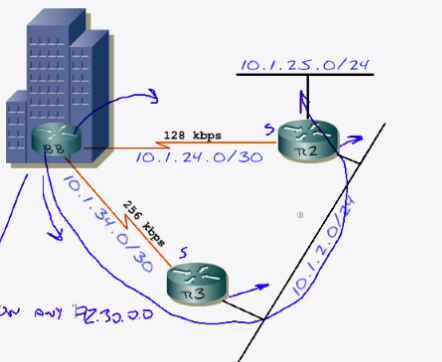
so referring to the diagram, the quickest route to 10.1.25.0 is via R3 and over the ethernet segment, as this has twice the bandwidth of serial0/0 link over to R2

BB-Router#show ip route 10.1.25.0
Routing entry for 10.1.25.0/24
Known via "eigrp 90", distance 90, metric 10642432, type internal
Redistributing via eigrp 90
Last update from 10.1.34.2 on Serial0/1, 00:08:53 ago
Routing Descriptor Blocks:
* 10.1.34.2, from 10.1.34.2, 00:08:53 ago, via Serial0/1
Route metric is 10642432, traffic share count is 1
Total delay is 25100 microseconds, minimum bandwidth is 256 Kbit
Reliability 252/255, minimum MTU 1500 bytes
Loading 1/255, Hops 2
and checking against the EIGRP topology table confirms the above;
BB-Router#show ip eigrp top 10.1.25.0 255.255.255.0
IP-EIGRP (AS 90): Topology entry for 10.1.25.0/24
State is Passive, Query origin flag is 1, 1 Successor(s), FD is 10642432
Routing Descriptor Blocks:
10.1.34.2 (Serial0/1), from 10.1.34.2, Send flag is 0x0
Composite metric is (10642432/156160), Route is Internal
Vector metric:
Minimum bandwidth is 256 Kbit
Total delay is 25100 microseconds
Reliability is 252/255
Load is 1/255
Minimum MTU is 1500
Hop count is 2
10.1.24.2 (Serial0/0), from 10.1.24.2, Send flag is 0x0
Composite metric is (20640000/128256), Route is Internal
Vector metric:
Minimum bandwidth is 128 Kbit
Total delay is 25000 microseconds
Reliability is 255/255
Load is 1/255
Minimum MTU is 1500
Hop count is 1
There we go, we see the sucessor route (this goes into the routing table) is the route via Serial0/1 to neighbour 10.1.34.2 via the 256kbit line, the route below it from 10.1.24.2 is the fessiable sucessor
 hey, remember how we work out the metric, lets take the 128kbit route;
10^7 = 10000000 ÷ 128kbits (min bandwidth) = 78125
78125 + all delay links which is 25000ms (25000ms ÷ 10 = 2500usec) = 80625
80625 X 256 = 20640000 is the metric for that route :0)
BB-Router#show ip eigrp topology
IP-EIGRP Topology Table for AS(90)/ID(172.30.8.1)
Codes: P - Passive, A - Active, U - Update, Q - Query, R - Reply,
r - reply Status, s - sia Status
P 10.1.2.0/24, 1 successors, FD is 10514432
via 10.1.34.2 (10514432/281600), Serial0/1
via 10.1.24.2 (20537600/281600), Serial0/0
P 10.1.24.2/32, 1 successors, FD is 20512000
via Rconnected (20512000/0)
P 10.1.25.0/24, 1 successors, FD is 10642432
via 10.1.34.2 (10642432/156160), Serial0/1
via 10.1.24.2 (20640000/128256), Serial0/0
P 10.1.24.0/30, 1 successors, FD is 20512000
via Connected, Serial0/0
P 10.1.34.0/30, 1 successors, FD is 10511872
via Connected, Serial0/1
P 172.30.2.0/24, 1 successors, FD is 128256
via Connected, Loopback2
P 172.30.3.0/24, 1 successors, FD is 128256
via Connected, Loopback3
P 172.30.0.0/24, 1 successors, FD is 128256
via Connected, Loopback0
P 172.30.1.0/24, 1 successors, FD is 128256
via Connected, Loopback1
P 172.30.6.0/24, 1 successors, FD is 128256
via Connected, Loopback6
P 172.30.7.0/24, 1 successors, FD is 128256
via Connected, Loopback7
P 172.30.4.0/24, 1 successors, FD is 128256
via Connected, Loopback4
P 172.30.5.0/24, 1 successors, FD is 128256
via Connected, Loopback5
P 172.30.8.0/24, 1 successors, FD is 128256
via Connected, Loopback8
All routes here are marked P, P = Passive (which is GOOD) lets have a look a route;
P 10.1.2.0/24, 1 successors, FD is 10514432
via 10.1.34.2 (10514432/281600), Serial0/1 <--- 256kbit link
via 10.1.24.2 (20537600/281600), Serial0/0
SO notice this 2 routes but only 1 successor, this is becuase 1 route has a better metric than the other (which is determined by the K metrics) the route via neighbour 10.1.34.2 is the successor (fessiable distance 10514432)
/28160) = Is Advertised Distance, this is the distance from your neighbour, so although both of them tied on this, the fessiable distance is the decider as to wheather they load balance or one becomes a sucessor or not (the WAN link bandwidths in this case decided it)
So KEWL! so very very KEWL!
anyways, right next step, we need a static route to be advertised about the 192.168.1.0/24
BB-Router(config)#ip route 192.168.1.0 255.255.255.0 null0
lets check the neighbours and see if they have got it;
R2#show ip route | i 192.168.1.0
D 192.168.1.0/24 [90/10537472] via 10.1.2.3, 00:01:33, Ethernet0/0
Sweeet, right thats objective 1 done.

Right, I have setup a new lab (seperate from my current lab) I have setup the lab as per Jeremys instructions, just IP addressing done so far ....
NOW lets get some ROUTING sorted!
NOTES
The network command has 2 functions
1) send hello's on any 172.30.0.0 interface
2) advertise the network
lets get EIGRP up and running on this backbone router;
BB-Router(config)#router eigrp 90
BB-Router(config-router)#network 172.30.0.0 0.0.255.255
BB-Router(config-router)#network 10.1.0.0 0.0.255.255
BB-Router(config-router)#no auto-summary
you kinda expect some magic or something right about now, but remember we have no neighbours yet :0(
BUT we can confirm that EIGRP is now running on the router;
BB-Router#show ip protocols
Routing Protocol is "eigrp 90"
Outgoing update filter list for all interfaces is not set
Incoming update filter list for all interfaces is not set
Default networks flagged in outgoing updates
Default networks accepted from incoming updates
EIGRP metric weight K1=1, K2=0, K3=1, K4=0, K5=0
EIGRP maximum hopcount 100
EIGRP maximum metric variance 1
Redistributing: eigrp 90
Automatic network summarization is not in effect
Maximum path: 4
Routing for Networks:
10.1.0.0/16 <----- shows /16 not /8 as not using default mask, tar no auto-summary
172.30.0.0 <----- This is default mask, it does not have to put /16
Routing Information Sources:
Gateway Distance Last Update
(this router) 90 00:03:51
Distance: internal 90 external 170
You will notice from the output our friends the K weights (the metric);
EIGRP metric weight K1=1, K2=0, K3=1, K4=0, K5=0
And look which ones we have, K1 and K3, Bandwidth and Delay - we know all about them :0)
Lets telnet over and get R2 EIGRP'd up;
R2(config)#router eigrp 90
R2(config-router)#no auto-summary
R2(config-router)#network 10.1.2.2 0.0.0.0
R2(config-router)#network 10.1.24.2 0.0.0.0
R2(config-router)#network 10.1.25.2 0.0.0.0
Always love seeing this notification;
01:05:24: %DUAL-5-NBRCHANGE: IP-EIGRP 90: Neighbor 10.1.24.2 (Serial0/0) is up: new adjacency network
10.1.25.2
Lets check out the neighbour relationships;
R2#show ip eigrp neighbours
IP-EIGRP neighbors for process 90
H Address Interface Hold Uptime SRTT RTO Q Seq Type
(sec) (ms) Cnt Num
0 10.1.24.1 Se0/0 13 00:06:43 474 2844 0 2
The H = At the beginning of the column stands for Handle, this is the order that it learnt the neighbours in, works from 0 being first, upwards ---->
Hold Time = This is the amount of time the router will wait till it considers it neighbour dead,
On a fast network (NBMA, T1 or greater) the Hold time is 15 seconds, bear in mind a HELLO is sent every 5 seconds, so if it misses 3 HELLO's that neighbour is considered dead, typically that HOLD time will not go below 10 seconds, if it does there could be some issues along the link which is causing it to miss a hello etc
Lets see;
R2#show ip eigr ne
IP-EIGRP neighbors for process 90
H Address Interface Hold Uptime SRTT RTO Q Seq Type
(sec) (ms) Cnt Num
0 10.1.24.1 Se0/0 11 00:06:45 474 2844 0 2
R2#show ip eigr ne
IP-EIGRP neighbors for process 90
H Address Interface Hold Uptime SRTT RTO Q Seq Type
(sec) (ms) Cnt Num
0 10.1.24.1 Se0/0 14 00:06:46 474 2844 0 2
Arh yes, we can see the 2nd time i ran it the Hold time went back up to 14 secs as it recieved an HELLO from the neighbour
SRTT = Source Round Trip Timer, how long did it take to get there and back from its neighbour (uses to this gauge how long it should wait to hear back from an UPDATE msg
RTO = Re Transmit Timeout, how long will it wait before it retransmits a msg
Q = How many packets are waiting in queue, sitting for neighbour (EIGRP msgs) should NEVER queue, if you see it go above zero, probably could be some bandwidth issues (routing protocols should send these as soon as they have it)
Seq Type = version of the EIGRP database
Lets check our routing table;
R2#show ip route
172.30.0.0/24 is subnetted, 9 subnets
D 172.30.2.0 [90/20640000] via 10.1.24.1, 00:28:06, Serial0/0
D 172.30.3.0 [90/20640000] via 10.1.24.1, 00:28:06, Serial0/0
D 172.30.0.0 [90/20640000] via 10.1.24.1, 00:28:06, Serial0/0
D 172.30.1.0 [90/20640000] via 10.1.24.1, 00:28:06, Serial0/0
D 172.30.6.0 [90/20640000] via 10.1.24.1, 00:28:06, Serial0/0
D 172.30.7.0 [90/20640000] via 10.1.24.1, 00:28:06, Serial0/0
D 172.30.4.0 [90/20640000] via 10.1.24.1, 00:28:06, Serial0/0
D 172.30.5.0 [90/20640000] via 10.1.24.1, 00:28:06, Serial0/0
D 172.30.8.0 [90/20640000] via 10.1.24.1, 00:28:06, Serial0/0
10.0.0.0/8 is variably subnetted, 5 subnets, 3 masks
C 10.1.2.0/24 is directly connected, Ethernet0/0
C 10.1.25.0/24 is directly connected, Loopback2
C 10.1.24.0/30 is directly connected, Serial0/0
D 10.1.34.0/30 [90/21024000] via 10.1.24.1, 00:28:07, Serial0/0
awesome! lets jump over to R3;
R3(config)#router eigrp 90
R3(config-router)#no auto-summary
R3(config-router)#network 10.1.2.3 0.0.0.0
R3(config-router)#network 10.1.34.2 0.0.0.0
Looking good;
R3#show ip eigrp neighbours
IP-EIGRP neighbors for process 90
H Address Interface Hold Uptime SRTT RTO Q Seq Type
(sec) (ms) Cnt Num
1 10.1.34.1 Se1/0 11 00:00:16 706 4236 0 4
0 10.1.2.2 Fa0/0 14 00:00:24 467 2802 0 8
Lets hop back to the back bone router and checking the routes;
BB-Router#show ip route
172.30.0.0/24 is subnetted, 9 subnets
C 172.30.2.0 is directly connected, Loopback2
C 172.30.3.0 is directly connected, Loopback3
C 172.30.0.0 is directly connected, Loopback0
C 172.30.1.0 is directly connected, Loopback1
C 172.30.6.0 is directly connected, Loopback6
C 172.30.7.0 is directly connected, Loopback7
C 172.30.4.0 is directly connected, Loopback4
C 172.30.5.0 is directly connected, Loopback5
C 172.30.8.0 is directly connected, Loopback8
10.0.0.0/8 is variably subnetted, 5 subnets, 3 masks
D 10.1.2.0/24 [90/10514432] via 10.1.34.2, 00:04:31, Serial0/1
D 10.1.25.0/24 [90/10642432] via 10.1.34.2, 00:04:31, Serial0/1
C 10.1.24.0/30 is directly connected, Serial0/0
C 10.1.34.0/30 is directly connected, Serial0/1
awesome, now as we would expect we are seeing the routes in the routing table favoring the higher bandwidth link to R3 (10.1.34.2/out Serial0/1);
BB-Router# show int serial0/1
Serial0/1 is up, line protocol is up
Hardware is QUICC Serial
Internet address is 10.1.34.1/30
MTU 1500 bytes, BW 256 Kbit, DLY 20000 usec, <---- 256kbit
so referring to the diagram, the quickest route to 10.1.25.0 is via R3 and over the ethernet segment, as this has twice the bandwidth of serial0/0 link over to R2

BB-Router#show ip route 10.1.25.0
Routing entry for 10.1.25.0/24
Known via "eigrp 90", distance 90, metric 10642432, type internal
Redistributing via eigrp 90
Last update from 10.1.34.2 on Serial0/1, 00:08:53 ago
Routing Descriptor Blocks:
* 10.1.34.2, from 10.1.34.2, 00:08:53 ago, via Serial0/1
Route metric is 10642432, traffic share count is 1
Total delay is 25100 microseconds, minimum bandwidth is 256 Kbit
Reliability 252/255, minimum MTU 1500 bytes
Loading 1/255, Hops 2
and checking against the EIGRP topology table confirms the above;
BB-Router#show ip eigrp top 10.1.25.0 255.255.255.0
IP-EIGRP (AS 90): Topology entry for 10.1.25.0/24
State is Passive, Query origin flag is 1, 1 Successor(s), FD is 10642432
Routing Descriptor Blocks:
10.1.34.2 (Serial0/1), from 10.1.34.2, Send flag is 0x0
Composite metric is (10642432/156160), Route is Internal
Vector metric:
Minimum bandwidth is 256 Kbit
Total delay is 25100 microseconds
Reliability is 252/255
Load is 1/255
Minimum MTU is 1500
Hop count is 2
10.1.24.2 (Serial0/0), from 10.1.24.2, Send flag is 0x0
Composite metric is (20640000/128256), Route is Internal
Vector metric:
Minimum bandwidth is 128 Kbit
Total delay is 25000 microseconds
Reliability is 255/255
Load is 1/255
Minimum MTU is 1500
Hop count is 1
There we go, we see the sucessor route (this goes into the routing table) is the route via Serial0/1 to neighbour 10.1.34.2 via the 256kbit line, the route below it from 10.1.24.2 is the fessiable sucessor
10^7 = 10000000 ÷ 128kbits (min bandwidth) = 78125
78125 + all delay links which is 25000ms (25000ms ÷ 10 = 2500usec) = 80625
80625 X 256 = 20640000 is the metric for that route :0)
BB-Router#show ip eigrp topology
IP-EIGRP Topology Table for AS(90)/ID(172.30.8.1)
Codes: P - Passive, A - Active, U - Update, Q - Query, R - Reply,
r - reply Status, s - sia Status
P 10.1.2.0/24, 1 successors, FD is 10514432
via 10.1.34.2 (10514432/281600), Serial0/1
via 10.1.24.2 (20537600/281600), Serial0/0
P 10.1.24.2/32, 1 successors, FD is 20512000
via Rconnected (20512000/0)
P 10.1.25.0/24, 1 successors, FD is 10642432
via 10.1.34.2 (10642432/156160), Serial0/1
via 10.1.24.2 (20640000/128256), Serial0/0
P 10.1.24.0/30, 1 successors, FD is 20512000
via Connected, Serial0/0
P 10.1.34.0/30, 1 successors, FD is 10511872
via Connected, Serial0/1
P 172.30.2.0/24, 1 successors, FD is 128256
via Connected, Loopback2
P 172.30.3.0/24, 1 successors, FD is 128256
via Connected, Loopback3
P 172.30.0.0/24, 1 successors, FD is 128256
via Connected, Loopback0
P 172.30.1.0/24, 1 successors, FD is 128256
via Connected, Loopback1
P 172.30.6.0/24, 1 successors, FD is 128256
via Connected, Loopback6
P 172.30.7.0/24, 1 successors, FD is 128256
via Connected, Loopback7
P 172.30.4.0/24, 1 successors, FD is 128256
via Connected, Loopback4
P 172.30.5.0/24, 1 successors, FD is 128256
via Connected, Loopback5
P 172.30.8.0/24, 1 successors, FD is 128256
via Connected, Loopback8
All routes here are marked P, P = Passive (which is GOOD) lets have a look a route;
P 10.1.2.0/24, 1 successors, FD is 10514432
via 10.1.34.2 (10514432/281600), Serial0/1 <--- 256kbit link
via 10.1.24.2 (20537600/281600), Serial0/0
SO notice this 2 routes but only 1 successor, this is becuase 1 route has a better metric than the other (which is determined by the K metrics) the route via neighbour 10.1.34.2 is the successor (fessiable distance 10514432)
/28160) = Is Advertised Distance, this is the distance from your neighbour, so although both of them tied on this, the fessiable distance is the decider as to wheather they load balance or one becomes a sucessor or not (the WAN link bandwidths in this case decided it)
So KEWL! so very very KEWL!
anyways, right next step, we need a static route to be advertised about the 192.168.1.0/24
BB-Router(config)#ip route 192.168.1.0 255.255.255.0 null0
lets check the neighbours and see if they have got it;
R2#show ip route | i 192.168.1.0
D 192.168.1.0/24 [90/10537472] via 10.1.2.3, 00:01:33, Ethernet0/0
Sweeet, right thats objective 1 done.
Friday, 11 November 2011


Calm down Mark, part of the CCNP is about planning and designing ... by now i would already be jacked into console port of my core router and have thrown a tonne of config at it!
One step at a time, iv made a note, a quick diagram and lets plan it and think about it, "not on the fly" usual stylee!

So ultimately create 2 VLANs, 1x LAN, 1x WAN, have RAS VPN, and additionally not on diagram a GRE tunnel routing EIGRP over to the works ADSL NTE ... DRRROOOOoooool
Right onward with study!
One step at a time, iv made a note, a quick diagram and lets plan it and think about it, "not on the fly" usual stylee!

So ultimately create 2 VLANs, 1x LAN, 1x WAN, have RAS VPN, and additionally not on diagram a GRE tunnel routing EIGRP over to the works ADSL NTE ... DRRROOOOoooool
Right onward with study!
Be interesting if we get one of these bad muftha's at work;
http://blog.riverbed.com/2011/01/infoworld-2011-technology-of-the-year.html
sound awesome!
http://blog.riverbed.com/2011/01/infoworld-2011-technology-of-the-year.html
sound awesome!
Wednesday, 9 November 2011
Completed "EIGRP Routing: Concepts and Planning" nugget tonight;
Even though Cisco designed EIGRP to be a
simple protocol, there are a few concepts you'll want to be aware of
before you move forward with implementation. This nugget walks through
the key tables, terms, and calculations you'll need to get started with
using EIGRP.
NOTES
WHY USE EIGRP?
1) Backup routes (fast convergence / DUAL)
2) Simple configuration
3) Flexability in summarisation
with OSPF you have to summarise at the ABR's or ASBR's
EIGRP = any point/interface can be do summarisation
4) Unequal cost load-balancing
ONLY protocol to do this (done via variance command)
5) Combines best of distance vector and link state
OSPF is fast, but not as fast as EIGRP due to the Topology table
It is a distance vector protocol (or advanced) because it only knows what it neighbours told it
Router running EIGRP maintains 3 tables;
Neighbour Table
If an adjanacy is formed, the relationship goes in here, done via hello protocol (as opposed to broadcast/multicast like RIP)
Topology Table
Holds the Sucessor routes in here (they are also in the routing table) along with Fessiable successor routes (could be 2 or 3 or so, so long as not "too bad" a route)
Routing Table
Sucessor routes in here along with routing table
EIGRP NEIGHBOURS MSGS
Hello:
Updates (unicast) and Neighbor discovery on multicast 224.0.0.10
NBMA network (i.e virtual circuit, frame relay, ATM etc) hello is every 60 seconds and HOLD time of 180 seconds
Point to Point (other) hello is every 5 seconds and HOLD time of 15 seconds.
Update:
Once neighbour is formed, router sends FULL routing table and waits for ACK back
Once formed only Hellos will be seen unless route goes down then updates will be sent (msg generally multicast*)
Query:
If network is not available then a DUAL QUERY is sent out for a backup route if one is not in the topology table
Reply:
Are sent in response to query packets, and a reply packet indicates that a new route to the destination has been found. Update, query and reply packets all use RTP and are considered reliable
Ack:
EIGRP requires acknowledgements from routing updates. (msg considered unreliable)
* During the initial exchange of routes between two new EIGRP neighbors, update packets are unicast rather than multicast
EIGRP = IP Protocol 88
Metric of 47019776 is infinite metric/unreachable, just like hop count of 16 in RIP, this will be used if the neighbour does not have a route to the network
UNDERSTANDING EIGRP METRIC CALCULATION
Bandwidth (K1)
Delay (K3)
Reliabilty (K4 & K5)
Loading (K2)
Does not use MTU (although that is seen)
An EIGRP update to a neighbor contains the cumulative value of each K weight (such as the sum of delays, and lowest bandwidth). From that, the neighbor receiving the update can calculate the sending neighbors metric for that route
Calculating the EIGRP default metric:
[(10,000,000/lowest Bandwidth) + (sum of delays in 10's of usec)] * 256
10,000,000 is what 10^7 equals
lowest Bandwidth = 10^7/BW, In kbits, BW output from ‘show interface’
Delay in 10′s of usec = DLY output from ‘show interface’
* Note: If the bandwidth division results in a decimal number, round down
So taking a route from my old lab,

Lets take this route that Router A knows about to the network on Router C/D
D 10.14.0.132/30 [90/2174976] via 10.14.0.2, 00:00:58, FastEthernet0/0
2610XM-A#show ip route 10.14.0.132
Routing entry for 10.14.0.132/30
Known via "eigrp 20", distance 90, metric 2174976, type internal
Redistributing via eigrp 20
Last update from 10.14.0.2 on FastEthernet0/0, 00:45:25 ago
Routing Descriptor Blocks:
* 10.14.0.2, from 10.14.0.2, 00:45:25 ago, via FastEthernet0/0
Route metric is 2174976, traffic share count is 1
Total delay is 20200 microseconds, minimum bandwidth is 1544 Kbit
Reliability 255/255, minimum MTU 1500 bytes
Loading 1/255, Hops 2
2610XM-A#show ip eigrp topology 10.14.0.132 255.255.255.252
IP-EIGRP (AS 20): Topology entry for 10.14.0.132/30
State is Passive, Query origin flag is 1, 1 Successor(s), FD is 2174976
Routing Descriptor Blocks:
10.14.0.2 (FastEthernet0/0), from 10.14.0.2, Send flag is 0x0
Composite metric is (2174976/2172416), Route is Internal
Vector metric:
Minimum bandwidth is 1544 Kbit
Total delay is 20200 microseconds
Reliability is 255/255
Load is 1/255
Minimum MTU is 1500
Hop count is 2
We can see the following information for this route 10.14.0.132/30
Route metric is 2174976
Total delay is 20200 microseconds
Minimum bandwidth is 1544 Kbit
So applying the above calculations to work out the metric;
10^7 = 10000000 ÷ 1544kbits (min bandwidth) = 6476.6839.... (round down to 6476)
6476 + all delay links which is 20200ms (20200ms ÷ 10 = 2020usec) = 8496
8496 X 256 = 2174976 is the metric for that route :0)
GOD I HATE MATHS!!! but there you go, i think cisco thought hang on a minute, we have a super kool routing protocol but we have made it tooo easy, lets complicate this a little .... jesus!
Right, over the next couple of days lets start planning/building my new lab topology ;0)
Subscribe to:
Posts (Atom)