Friday, 6 July 2012

TrainSignal Chapter 9, Lecture 1 - Rules and an EIGRP LAB


So, R1 has both neighbours (different AS's) and only R1 can see the loopbacks on R2 & R3, if we jump on R2 & R3 we can see that have NO EIGRP routes.


Lets configure some simple 1-WAY redistribution ;


Lets check R2 for the routes ....


TrainSignal Chapter 9, Lecture 2 - RIP Redistribution


We can see the route 172.12.34.3 but cannot ping it, hmmmmmmmmm
Lets find out on the next vid,


TrainSignal Chapter 9, Lecture 3 - OSPF Redistribution


So just to recap, R2 cannot ping the Ethernet segment on R3, lets check R1 can;


Yes cause it can!


Wednesday, 4 July 2012

TrainSignal Chapter 8, Lecture 6 - Final Vid, IPv6 Transitioning....


TrainSignal Chapter 8, Lecture 5 - OSPFv3 Lab From Scratch on R2


Most of the commands/topics and configs are in the workbook, so here are the highpoints of the config and things to remember;


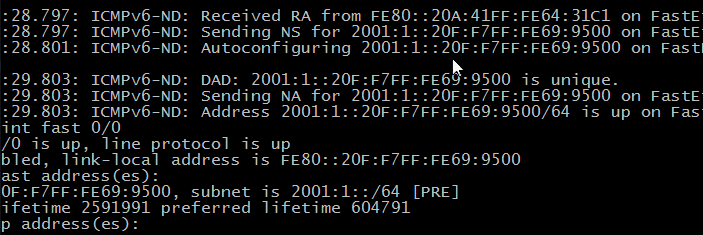
Notice the [TEN] here on the link-local .... this will change once the interface is up and ND has had a chance to run DAD (Duplication Address Detection) :


Now we have a Global address and the link-local is not showing as [TEN]

And here is the reminder about configuring an IPV4 Address for the RID:


So lets do that;


TrainSignal Chapter 8, Lecture 4 - OSPFv3 Lab Commands


Below is the important parts of some of the config:


Becuase this router has no IPv4 addresess, we need to specify one for the RID!


This is a good one! you run show ip route and see no routes!!!! thats because we now need to run show ipv6 route;


One of the other routers config: