Been doing alot of reading and concentrating on work atm, however have been playing with nbar and netflow for a work project, got some pretty graphs below;
This is a blog of my journey, through my CCNP path to hopefully certification day :0)
Friday, 18 November 2011
Monday, 14 November 2011
Objective 5
Here we are going to perform unequal cost load balancing accross the 256kbps and 128kbps link via EIGRP. This is done via the variance command which is set to 1 by default, which means it will only load balance with equal links (bandwidth speed).
To load balance we will use the variance 2 command, which means "I will load balance accross links that are twice as bad as my primary"
If we check the topology table we shall see the metric for each route;
BB-Router# show ip eigrp topology
IP-EIGRP Topology Table for AS(90)/ID(172.30.8.1)
P 10.1.2.0/24, 1 successors, FD is 10514432
via 10.1.34.2 (10514432/28160), Serial0/1
via 10.1.24.2 (20537600/281600), Serial0/0
The primary route has a metric of 10514432 (256kbps) and the fessiable sucessor has a metric of 20537600 (128kbps) which is rougly twice as bad;
10514432 x 2 = 21028864
So by using the variance command using a multiplier of 2 (as this will would encompass the 128kbps links metric) we can load balance
BB-Router(config)#router eigrp 90
BB-Router(config-router)#variance ?
<1-128> Metric variance multiplier
BB-Router(config-router)#variance 2
Lets check the routing table now;
BB-Router#show ip route
172.30.0.0/16 is variably subnetted, 10 subnets, 2 masks
C 172.30.2.0/24 is directly connected, Loopback2
C 172.30.3.0/24 is directly connected, Loopback3
D 172.30.0.0/21 is a summary, 00:00:20, Null0
C 172.30.0.0/24 is directly connected, Loopback0
C 172.30.1.0/24 is directly connected, Loopback1
C 172.30.6.0/24 is directly connected, Loopback6
C 172.30.7.0/24 is directly connected, Loopback7
C 172.30.4.0/24 is directly connected, Loopback4
C 172.30.5.0/24 is directly connected, Loopback5
C 172.30.8.0/24 is directly connected, Loopback8
10.0.0.0/8 is variably subnetted, 5 subnets, 3 masks
D 10.1.2.0/24 [90/10514432] via 10.1.34.2, 00:00:20, Serial0/1
[90/20537600] via 10.1.24.2, 00:00:20, Serial0/0
C 10.1.24.2/32 is directly connected, Serial0/0
D 10.1.25.0/24 [90/10642432] via 10.1.34.2, 00:00:20, Serial0/1 <--- load balancing
[90/20640000] via 10.1.24.2, 00:00:20, Serial0/0 <--- load balancing
Now we can see we are load balancing over both links, EIGRP will intelligent load balance over the links, for every 2 packets send over the 256kbps link it will send 1 packet of the 128kbps .... AWESOME!
Here we are going to perform unequal cost load balancing accross the 256kbps and 128kbps link via EIGRP. This is done via the variance command which is set to 1 by default, which means it will only load balance with equal links (bandwidth speed).
To load balance we will use the variance 2 command, which means "I will load balance accross links that are twice as bad as my primary"
If we check the topology table we shall see the metric for each route;
BB-Router# show ip eigrp topology
IP-EIGRP Topology Table for AS(90)/ID(172.30.8.1)
P 10.1.2.0/24, 1 successors, FD is 10514432
via 10.1.34.2 (10514432/28160), Serial0/1
via 10.1.24.2 (20537600/281600), Serial0/0
The primary route has a metric of 10514432 (256kbps) and the fessiable sucessor has a metric of 20537600 (128kbps) which is rougly twice as bad;
10514432 x 2 = 21028864
So by using the variance command using a multiplier of 2 (as this will would encompass the 128kbps links metric) we can load balance
BB-Router(config)#router eigrp 90
BB-Router(config-router)#variance ?
<1-128> Metric variance multiplier
BB-Router(config-router)#variance 2
Lets check the routing table now;
BB-Router#show ip route
172.30.0.0/16 is variably subnetted, 10 subnets, 2 masks
C 172.30.2.0/24 is directly connected, Loopback2
C 172.30.3.0/24 is directly connected, Loopback3
D 172.30.0.0/21 is a summary, 00:00:20, Null0
C 172.30.0.0/24 is directly connected, Loopback0
C 172.30.1.0/24 is directly connected, Loopback1
C 172.30.6.0/24 is directly connected, Loopback6
C 172.30.7.0/24 is directly connected, Loopback7
C 172.30.4.0/24 is directly connected, Loopback4
C 172.30.5.0/24 is directly connected, Loopback5
C 172.30.8.0/24 is directly connected, Loopback8
10.0.0.0/8 is variably subnetted, 5 subnets, 3 masks
D 10.1.2.0/24 [90/10514432] via 10.1.34.2, 00:00:20, Serial0/1
[90/20537600] via 10.1.24.2, 00:00:20, Serial0/0
C 10.1.24.2/32 is directly connected, Serial0/0
D 10.1.25.0/24 [90/10642432] via 10.1.34.2, 00:00:20, Serial0/1 <--- load balancing
[90/20640000] via 10.1.24.2, 00:00:20, Serial0/0 <--- load balancing
Now we can see we are load balancing over both links, EIGRP will intelligent load balance over the links, for every 2 packets send over the 256kbps link it will send 1 packet of the 128kbps .... AWESOME!
Objective 4
For this objective we need to summarise 172.30.0.0 172.30.7.255 into a single network, we cant include 172.30.8.0/24 as the summarisation will not be as efficient
1 1 1 1 1 5 bits needed
128 64 32 16 8 4 2 1
8 8 5 = bits
11111111.11111111.11111000.0------- = 248
mask = 255.255.248.0 /21 in CIDR notation
Routing table BEFORE
R2>show ip route
Gateway of last resort is 10.1.2.3 to network 192.168.1.0
172.30.0.0/24 is subnetted, 9 subnets
D 172.30.2.0 [90/10665472] via 10.1.2.3, 01:08:09, Ethernet0/0
D 172.30.3.0 [90/10665472] via 10.1.2.3, 01:08:09, Ethernet0/0
D 172.30.0.0 [90/10665472] via 10.1.2.3, 01:08:09, Ethernet0/0
D 172.30.1.0 [90/10665472] via 10.1.2.3, 01:08:09, Ethernet0/0
D 172.30.6.0 [90/10665472] via 10.1.2.3, 01:08:09, Ethernet0/0
D 172.30.7.0 [90/10665472] via 10.1.2.3, 01:08:09, Ethernet0/0
D 172.30.4.0 [90/10665472] via 10.1.2.3, 01:08:09, Ethernet0/0
D 172.30.5.0 [90/10665472] via 10.1.2.3, 01:08:09, Ethernet0/0
D 172.30.8.0 [90/10665472] via 10.1.2.3, 01:08:09, Ethernet0/0
10.0.0.0/8 is variably subnetted, 5 subnets, 3 masks
C 10.1.2.0/24 is directly connected, Ethernet0/0
C 10.1.24.1/32 is directly connected, Serial0/0
C 10.1.25.0/24 is directly connected, Loopback2
C 10.1.24.0/30 is directly connected, Serial0/0
D 10.1.34.0/30 [90/10537472] via 10.1.2.3, 01:08:12, Ethernet0/0
D* 192.168.1.0/24 [90/10537472] via 10.1.2.3, 01:08:09, Ethernet0/0
BB-Router(config)#int ser0/0
BB-Router(config-if)#ip summary-address eigrp 90 172.30.0.0 255.255.248.0
R2>show ip route
Gateway of last resort is 10.1.2.3 to network 192.168.1.0
172.30.0.0/16 is variably subnetted, 10 subnets, 2 masks
D 172.30.2.0/24 [90/10665472] via 10.1.2.3, 01:10:11, Ethernet0/0
D 172.30.3.0/24 [90/10665472] via 10.1.2.3, 01:10:11, Ethernet0/0
D 172.30.0.0/21 [90/20640000] via 10.1.24.1, 00:00:15, Serial0/0 <---- there it is
D 172.30.0.0/24 [90/10665472] via 10.1.2.3, 01:10:11, Ethernet0/0
D 172.30.1.0/24 [90/10665472] via 10.1.2.3, 01:10:11, Ethernet0/0
D 172.30.6.0/24 [90/10665472] via 10.1.2.3, 01:10:11, Ethernet0/0
D 172.30.7.0/24 [90/10665472] via 10.1.2.3, 01:10:11, Ethernet0/0
D 172.30.4.0/24 [90/10665472] via 10.1.2.3, 01:10:11, Ethernet0/0
D 172.30.5.0/24 [90/10665472] via 10.1.2.3, 01:10:11, Ethernet0/0
D 172.30.8.0/24 [90/10665472] via 10.1.2.3, 00:00:15, Ethernet0/0
10.0.0.0/8 is variably subnetted, 5 subnets, 3 masks
C 10.1.2.0/24 is directly connected, Ethernet0/0
C 10.1.24.1/32 is directly connected, Serial0/0
C 10.1.25.0/24 is directly connected, Loopback2
C 10.1.24.0/30 is directly connected, Serial0/0
D 10.1.34.0/30 [90/10537472] via 10.1.2.3, 00:00:15, Ethernet0/0
D* 192.168.1.0/24 [90/10537472] via 10.1.2.3, 00:00:15, Ethernet0/0
We can see the new summary route taking affect, but R2 is still learning about this network from 10.1.2.3 (R3) REMEMBER regardless of Admin distance or speed of link, if a router has a more SPECIFIC mask for a network, it will use that route!!!
lets fix that;
BB-Router(config)#int serial0/1
BB-Router(config-if)#ip summary-address eigrp 90 172.30.0.0 255.255.248.0
R2>show ip route
172.30.0.0/16 is variably subnetted, 2 subnets, 2 masks
D 172.30.0.0/21 [90/10665472] via 10.1.2.3, 00:14:38, Ethernet0/0 <-- summary
D 172.30.8.0/24 [90/10665472] via 10.1.2.3, 00:14:38, Ethernet0/0 <--
10.0.0.0/8 is variably subnetted, 5 subnets, 3 masks
C 10.1.2.0/24 is directly connected, Ethernet0/0
C 10.1.24.1/32 is directly connected, Serial0/0
C 10.1.25.0/24 is directly connected, Loopback2
C 10.1.24.0/30 is directly connected, Serial0/0
D 10.1.34.0/30 [90/10537472] via 10.1.2.3, 00:16:07, Ethernet0/0
D* 192.168.1.0/24 [90/10537472] via 10.1.2.3, 00:14:38, Ethernet0/0
Excellent! notice we have the 172.30.8.0/24 route too, this is becuase the summary is only advertising; 172.30.0.0 --> 172.30.7.255 and the network statement on EIGRP catches the rest of the 172 network;
router eigrp 90
passive-interface default
no passive-interface Serial0/0
no passive-interface Serial0/1
network 10.1.0.0 0.0.255.255
network 172.30.0.0
network 192.168.1.0
no auto-summary
Job done
For this objective we need to summarise 172.30.0.0 172.30.7.255 into a single network, we cant include 172.30.8.0/24 as the summarisation will not be as efficient
1 1 1 1 1 5 bits needed
128 64 32 16 8 4 2 1
8 8 5 = bits
11111111.11111111.11111000.0------- = 248
mask = 255.255.248.0 /21 in CIDR notation
Routing table BEFORE
R2>show ip route
Gateway of last resort is 10.1.2.3 to network 192.168.1.0
172.30.0.0/24 is subnetted, 9 subnets
D 172.30.2.0 [90/10665472] via 10.1.2.3, 01:08:09, Ethernet0/0
D 172.30.3.0 [90/10665472] via 10.1.2.3, 01:08:09, Ethernet0/0
D 172.30.0.0 [90/10665472] via 10.1.2.3, 01:08:09, Ethernet0/0
D 172.30.1.0 [90/10665472] via 10.1.2.3, 01:08:09, Ethernet0/0
D 172.30.6.0 [90/10665472] via 10.1.2.3, 01:08:09, Ethernet0/0
D 172.30.7.0 [90/10665472] via 10.1.2.3, 01:08:09, Ethernet0/0
D 172.30.4.0 [90/10665472] via 10.1.2.3, 01:08:09, Ethernet0/0
D 172.30.5.0 [90/10665472] via 10.1.2.3, 01:08:09, Ethernet0/0
D 172.30.8.0 [90/10665472] via 10.1.2.3, 01:08:09, Ethernet0/0
10.0.0.0/8 is variably subnetted, 5 subnets, 3 masks
C 10.1.2.0/24 is directly connected, Ethernet0/0
C 10.1.24.1/32 is directly connected, Serial0/0
C 10.1.25.0/24 is directly connected, Loopback2
C 10.1.24.0/30 is directly connected, Serial0/0
D 10.1.34.0/30 [90/10537472] via 10.1.2.3, 01:08:12, Ethernet0/0
D* 192.168.1.0/24 [90/10537472] via 10.1.2.3, 01:08:09, Ethernet0/0
BB-Router(config)#int ser0/0
BB-Router(config-if)#ip summary-address eigrp 90 172.30.0.0 255.255.248.0
R2>show ip route
Gateway of last resort is 10.1.2.3 to network 192.168.1.0
172.30.0.0/16 is variably subnetted, 10 subnets, 2 masks
D 172.30.2.0/24 [90/10665472] via 10.1.2.3, 01:10:11, Ethernet0/0
D 172.30.3.0/24 [90/10665472] via 10.1.2.3, 01:10:11, Ethernet0/0
D 172.30.0.0/21 [90/20640000] via 10.1.24.1, 00:00:15, Serial0/0 <---- there it is
D 172.30.0.0/24 [90/10665472] via 10.1.2.3, 01:10:11, Ethernet0/0
D 172.30.1.0/24 [90/10665472] via 10.1.2.3, 01:10:11, Ethernet0/0
D 172.30.6.0/24 [90/10665472] via 10.1.2.3, 01:10:11, Ethernet0/0
D 172.30.7.0/24 [90/10665472] via 10.1.2.3, 01:10:11, Ethernet0/0
D 172.30.4.0/24 [90/10665472] via 10.1.2.3, 01:10:11, Ethernet0/0
D 172.30.5.0/24 [90/10665472] via 10.1.2.3, 01:10:11, Ethernet0/0
D 172.30.8.0/24 [90/10665472] via 10.1.2.3, 00:00:15, Ethernet0/0
10.0.0.0/8 is variably subnetted, 5 subnets, 3 masks
C 10.1.2.0/24 is directly connected, Ethernet0/0
C 10.1.24.1/32 is directly connected, Serial0/0
C 10.1.25.0/24 is directly connected, Loopback2
C 10.1.24.0/30 is directly connected, Serial0/0
D 10.1.34.0/30 [90/10537472] via 10.1.2.3, 00:00:15, Ethernet0/0
D* 192.168.1.0/24 [90/10537472] via 10.1.2.3, 00:00:15, Ethernet0/0
We can see the new summary route taking affect, but R2 is still learning about this network from 10.1.2.3 (R3) REMEMBER regardless of Admin distance or speed of link, if a router has a more SPECIFIC mask for a network, it will use that route!!!
lets fix that;
BB-Router(config)#int serial0/1
BB-Router(config-if)#ip summary-address eigrp 90 172.30.0.0 255.255.248.0
R2>show ip route
172.30.0.0/16 is variably subnetted, 2 subnets, 2 masks
D 172.30.0.0/21 [90/10665472] via 10.1.2.3, 00:14:38, Ethernet0/0 <-- summary
D 172.30.8.0/24 [90/10665472] via 10.1.2.3, 00:14:38, Ethernet0/0 <--
10.0.0.0/8 is variably subnetted, 5 subnets, 3 masks
C 10.1.2.0/24 is directly connected, Ethernet0/0
C 10.1.24.1/32 is directly connected, Serial0/0
C 10.1.25.0/24 is directly connected, Loopback2
C 10.1.24.0/30 is directly connected, Serial0/0
D 10.1.34.0/30 [90/10537472] via 10.1.2.3, 00:16:07, Ethernet0/0
D* 192.168.1.0/24 [90/10537472] via 10.1.2.3, 00:14:38, Ethernet0/0
Excellent! notice we have the 172.30.8.0/24 route too, this is becuase the summary is only advertising; 172.30.0.0 --> 172.30.7.255 and the network statement on EIGRP catches the rest of the 172 network;
router eigrp 90
passive-interface default
no passive-interface Serial0/0
no passive-interface Serial0/1
network 10.1.0.0 0.0.255.255
network 172.30.0.0
network 192.168.1.0
no auto-summary
Job done
3rd Objective;

PASSIVE INTERFACES
If we look at R2, this router has an interface in 10.1.25.0/24, there is no other router on this segment yet R2 is sending hello's out this interface trying to actively form a relationship with an EIGRP neighbour. This is a HUGE security hole as someone could plug in there own router and get EIGRP up and running and start injecting routes into the network, or better yet he could pull off a man in the middle attack and be packet sniffing all the traffic and forwarding it on.
One approach would be to remove the network from EIGRP, BUT this now means you are not advertising this network.....
This is where passive interfaces come in, as they disable the hello messages on that interface meaning no neighbour can form BUT it will still advertise the network to the rest of your EIGRP topology :0)
R2(config)#router eigrp 90
R2(config-router)#passive-interface loopback 2
(Im doing loopback2 as i didnt have another fastethernet port like on the CBT/network diagram)
So now, no hello messages will be sent out to 10.1.25.0/24 and no neighbourships will form and no routes learnt *dusts hands*
This is very different to what RIP's passive interface does;
It wont send updates out the interface (RIP doesn't form neighbours like EIGRP,just sends updates via broadcast or multicast depending on version) BUT it will still accept updates from other RIP routers and add them updates to the routing table.
Now lets secure the BackBone router, we have aload of interfaces (loopbacks in this example, but hey!) It would be alot more secure and easier for us to set all interfaces by default as passive
BB-Router(config)#router eigrp 90
BB-Router(config-router)#passive-interface default
BB-Router(config-router)#
00:36:33: %DUAL-5-NBRCHANGE: IP-EIGRP 90: Neighbor 10.1.24.2 (Serial0/0) is down: interface passive
00:36:33: %DUAL-5-NBRCHANGE: IP-EIGRP 90: Neighbor 10.1.34.2 (Serial0/1) is down: interface passive
Obviously this downs the neighbours straightaway as we have disabled the hello messages from talking to the neighbour, to get it up and running again we use the no command;
BB-Router(config-router)#no passive-interface serial0/0
BB-Router(config-router)#no passive-interface serial0/1
00:37:31: %DUAL-5-NBRCHANGE: IP-EIGRP 90: Neighbor 10.1.24.2 (Serial0/0) is up: new adjacency
00:37:31: %SYS-5-CONFIG_I: Configured from console by vty1 (10.1.34.2)
00:37:34: %DUAL-5-NBRCHANGE: IP-EIGRP 90: Neighbor 10.1.34.2 (Serial0/1) is up: new adjacency
heres it all together in the running config;
BB-Router#show run | s eigrp
router eigrp 90
passive-interface default
no passive-interface Serial0/0
no passive-interface Serial0/1
network 10.1.0.0 0.0.255.255
network 172.30.0.0
network 192.168.1.0
no auto-summary

PASSIVE INTERFACES
If we look at R2, this router has an interface in 10.1.25.0/24, there is no other router on this segment yet R2 is sending hello's out this interface trying to actively form a relationship with an EIGRP neighbour. This is a HUGE security hole as someone could plug in there own router and get EIGRP up and running and start injecting routes into the network, or better yet he could pull off a man in the middle attack and be packet sniffing all the traffic and forwarding it on.
One approach would be to remove the network from EIGRP, BUT this now means you are not advertising this network.....
This is where passive interfaces come in, as they disable the hello messages on that interface meaning no neighbour can form BUT it will still advertise the network to the rest of your EIGRP topology :0)
R2(config)#router eigrp 90
R2(config-router)#passive-interface loopback 2
(Im doing loopback2 as i didnt have another fastethernet port like on the CBT/network diagram)
So now, no hello messages will be sent out to 10.1.25.0/24 and no neighbourships will form and no routes learnt *dusts hands*
This is very different to what RIP's passive interface does;
It wont send updates out the interface (RIP doesn't form neighbours like EIGRP,just sends updates via broadcast or multicast depending on version) BUT it will still accept updates from other RIP routers and add them updates to the routing table.
----------------------------------------------------------------------------------
RIP's passive interface NOT as secure as EIGRP's passive interface
--------------------------------------------------------------------------------
RIP's passive interface NOT as secure as EIGRP's passive interface
--------------------------------------------------------------------------------
Now lets secure the BackBone router, we have aload of interfaces (loopbacks in this example, but hey!) It would be alot more secure and easier for us to set all interfaces by default as passive
BB-Router(config)#router eigrp 90
BB-Router(config-router)#passive-interface default
BB-Router(config-router)#
00:36:33: %DUAL-5-NBRCHANGE: IP-EIGRP 90: Neighbor 10.1.24.2 (Serial0/0) is down: interface passive
00:36:33: %DUAL-5-NBRCHANGE: IP-EIGRP 90: Neighbor 10.1.34.2 (Serial0/1) is down: interface passive
Obviously this downs the neighbours straightaway as we have disabled the hello messages from talking to the neighbour, to get it up and running again we use the no command;
BB-Router(config-router)#no passive-interface serial0/0
BB-Router(config-router)#no passive-interface serial0/1
00:37:31: %DUAL-5-NBRCHANGE: IP-EIGRP 90: Neighbor 10.1.24.2 (Serial0/0) is up: new adjacency
00:37:31: %SYS-5-CONFIG_I: Configured from console by vty1 (10.1.34.2)
00:37:34: %DUAL-5-NBRCHANGE: IP-EIGRP 90: Neighbor 10.1.34.2 (Serial0/1) is up: new adjacency
heres it all together in the running config;
BB-Router#show run | s eigrp
router eigrp 90
passive-interface default
no passive-interface Serial0/0
no passive-interface Serial0/1
network 10.1.0.0 0.0.255.255
network 172.30.0.0
network 192.168.1.0
no auto-summary
Sunday, 13 November 2011
2nd objective;
we can either use re-distrubtion, like re-distributing a static route, but then you might have other routes you do not wish to advertise so you have to filter ... turns abit of a headache (no default-information orginate command like OSPF :0( )
likewise you could create a static 0.0.0.0 0.0.0.0 <next hop> and then put this into EIGRP via network 0.0.0.0, BUT this will advertise all networks!!! BE CAREFUL WITH THAT COMMAND
IP DEFAULT NETWORK
BB-Router(config)#ip default-network 192.168.1.0
BB-Router#show ip route
S* 192.168.1.0/24 is directly connected, Null0
* - candidate default,
lets jump over and have alook at one of the other neighbours;
R3# show ip route
Gateway of last resort is 10.1.34.1 to network 192.168.1.0
D* 192.168.1.0/24 [90/10511872] via 10.1.34.1, 00:04:03, Serial1/0
COOLIO, mission accomplished (not as kool as OSPF, but hey!)
... ONE THING TO NOTE! the network for this command HAS to be classful!?!?! ... so for this route it was okay as this was a class C network, but say we wanted a default route for one of the loopbacks ... 172.32.8.0/24, we would have to use a /16 - WEIRD?!?!? .. dont like this command!
we can either use re-distrubtion, like re-distributing a static route, but then you might have other routes you do not wish to advertise so you have to filter ... turns abit of a headache (no default-information orginate command like OSPF :0( )
likewise you could create a static 0.0.0.0 0.0.0.0 <next hop> and then put this into EIGRP via network 0.0.0.0, BUT this will advertise all networks!!! BE CAREFUL WITH THAT COMMAND
IP DEFAULT NETWORK
BB-Router(config)#ip default-network 192.168.1.0
BB-Router#show ip route
S* 192.168.1.0/24 is directly connected, Null0
* - candidate default,
lets jump over and have alook at one of the other neighbours;
R3# show ip route
Gateway of last resort is 10.1.34.1 to network 192.168.1.0
D* 192.168.1.0/24 [90/10511872] via 10.1.34.1, 00:04:03, Serial1/0
COOLIO, mission accomplished (not as kool as OSPF, but hey!)
... ONE THING TO NOTE! the network for this command HAS to be classful!?!?! ... so for this route it was okay as this was a class C network, but say we wanted a default route for one of the loopbacks ... 172.32.8.0/24, we would have to use a /16 - WEIRD?!?!? .. dont like this command!
Saturday, 12 November 2011
THE EIGRP LAB

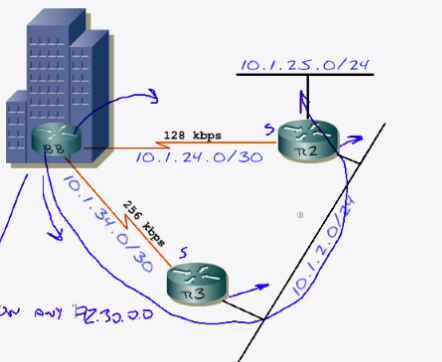
Right, I have setup a new lab (seperate from my current lab) I have setup the lab as per Jeremys instructions, just IP addressing done so far ....
NOW lets get some ROUTING sorted!
NOTES
The network command has 2 functions
1) send hello's on any 172.30.0.0 interface
2) advertise the network
lets get EIGRP up and running on this backbone router;
BB-Router(config)#router eigrp 90
BB-Router(config-router)#network 172.30.0.0 0.0.255.255
BB-Router(config-router)#network 10.1.0.0 0.0.255.255
BB-Router(config-router)#no auto-summary
you kinda expect some magic or something right about now, but remember we have no neighbours yet :0(
BUT we can confirm that EIGRP is now running on the router;
BB-Router#show ip protocols
Routing Protocol is "eigrp 90"
Outgoing update filter list for all interfaces is not set
Incoming update filter list for all interfaces is not set
Default networks flagged in outgoing updates
Default networks accepted from incoming updates
EIGRP metric weight K1=1, K2=0, K3=1, K4=0, K5=0
EIGRP maximum hopcount 100
EIGRP maximum metric variance 1
Redistributing: eigrp 90
Automatic network summarization is not in effect
Maximum path: 4
Routing for Networks:
10.1.0.0/16 <----- shows /16 not /8 as not using default mask, tar no auto-summary
172.30.0.0 <----- This is default mask, it does not have to put /16
Routing Information Sources:
Gateway Distance Last Update
(this router) 90 00:03:51
Distance: internal 90 external 170
You will notice from the output our friends the K weights (the metric);
EIGRP metric weight K1=1, K2=0, K3=1, K4=0, K5=0
And look which ones we have, K1 and K3, Bandwidth and Delay - we know all about them :0)
Lets telnet over and get R2 EIGRP'd up;
R2(config)#router eigrp 90
R2(config-router)#no auto-summary
R2(config-router)#network 10.1.2.2 0.0.0.0
R2(config-router)#network 10.1.24.2 0.0.0.0
R2(config-router)#network 10.1.25.2 0.0.0.0
Always love seeing this notification;
01:05:24: %DUAL-5-NBRCHANGE: IP-EIGRP 90: Neighbor 10.1.24.2 (Serial0/0) is up: new adjacency network
10.1.25.2
Lets check out the neighbour relationships;
R2#show ip eigrp neighbours
IP-EIGRP neighbors for process 90
H Address Interface Hold Uptime SRTT RTO Q Seq Type
(sec) (ms) Cnt Num
0 10.1.24.1 Se0/0 13 00:06:43 474 2844 0 2
The H = At the beginning of the column stands for Handle, this is the order that it learnt the neighbours in, works from 0 being first, upwards ---->
Hold Time = This is the amount of time the router will wait till it considers it neighbour dead,
On a fast network (NBMA, T1 or greater) the Hold time is 15 seconds, bear in mind a HELLO is sent every 5 seconds, so if it misses 3 HELLO's that neighbour is considered dead, typically that HOLD time will not go below 10 seconds, if it does there could be some issues along the link which is causing it to miss a hello etc
Lets see;
R2#show ip eigr ne
IP-EIGRP neighbors for process 90
H Address Interface Hold Uptime SRTT RTO Q Seq Type
(sec) (ms) Cnt Num
0 10.1.24.1 Se0/0 11 00:06:45 474 2844 0 2
R2#show ip eigr ne
IP-EIGRP neighbors for process 90
H Address Interface Hold Uptime SRTT RTO Q Seq Type
(sec) (ms) Cnt Num
0 10.1.24.1 Se0/0 14 00:06:46 474 2844 0 2
Arh yes, we can see the 2nd time i ran it the Hold time went back up to 14 secs as it recieved an HELLO from the neighbour
SRTT = Source Round Trip Timer, how long did it take to get there and back from its neighbour (uses to this gauge how long it should wait to hear back from an UPDATE msg
RTO = Re Transmit Timeout, how long will it wait before it retransmits a msg
Q = How many packets are waiting in queue, sitting for neighbour (EIGRP msgs) should NEVER queue, if you see it go above zero, probably could be some bandwidth issues (routing protocols should send these as soon as they have it)
Seq Type = version of the EIGRP database
Lets check our routing table;
R2#show ip route
172.30.0.0/24 is subnetted, 9 subnets
D 172.30.2.0 [90/20640000] via 10.1.24.1, 00:28:06, Serial0/0
D 172.30.3.0 [90/20640000] via 10.1.24.1, 00:28:06, Serial0/0
D 172.30.0.0 [90/20640000] via 10.1.24.1, 00:28:06, Serial0/0
D 172.30.1.0 [90/20640000] via 10.1.24.1, 00:28:06, Serial0/0
D 172.30.6.0 [90/20640000] via 10.1.24.1, 00:28:06, Serial0/0
D 172.30.7.0 [90/20640000] via 10.1.24.1, 00:28:06, Serial0/0
D 172.30.4.0 [90/20640000] via 10.1.24.1, 00:28:06, Serial0/0
D 172.30.5.0 [90/20640000] via 10.1.24.1, 00:28:06, Serial0/0
D 172.30.8.0 [90/20640000] via 10.1.24.1, 00:28:06, Serial0/0
10.0.0.0/8 is variably subnetted, 5 subnets, 3 masks
C 10.1.2.0/24 is directly connected, Ethernet0/0
C 10.1.25.0/24 is directly connected, Loopback2
C 10.1.24.0/30 is directly connected, Serial0/0
D 10.1.34.0/30 [90/21024000] via 10.1.24.1, 00:28:07, Serial0/0
awesome! lets jump over to R3;
R3(config)#router eigrp 90
R3(config-router)#no auto-summary
R3(config-router)#network 10.1.2.3 0.0.0.0
R3(config-router)#network 10.1.34.2 0.0.0.0
Looking good;
R3#show ip eigrp neighbours
IP-EIGRP neighbors for process 90
H Address Interface Hold Uptime SRTT RTO Q Seq Type
(sec) (ms) Cnt Num
1 10.1.34.1 Se1/0 11 00:00:16 706 4236 0 4
0 10.1.2.2 Fa0/0 14 00:00:24 467 2802 0 8
Lets hop back to the back bone router and checking the routes;
BB-Router#show ip route
172.30.0.0/24 is subnetted, 9 subnets
C 172.30.2.0 is directly connected, Loopback2
C 172.30.3.0 is directly connected, Loopback3
C 172.30.0.0 is directly connected, Loopback0
C 172.30.1.0 is directly connected, Loopback1
C 172.30.6.0 is directly connected, Loopback6
C 172.30.7.0 is directly connected, Loopback7
C 172.30.4.0 is directly connected, Loopback4
C 172.30.5.0 is directly connected, Loopback5
C 172.30.8.0 is directly connected, Loopback8
10.0.0.0/8 is variably subnetted, 5 subnets, 3 masks
D 10.1.2.0/24 [90/10514432] via 10.1.34.2, 00:04:31, Serial0/1
D 10.1.25.0/24 [90/10642432] via 10.1.34.2, 00:04:31, Serial0/1
C 10.1.24.0/30 is directly connected, Serial0/0
C 10.1.34.0/30 is directly connected, Serial0/1
awesome, now as we would expect we are seeing the routes in the routing table favoring the higher bandwidth link to R3 (10.1.34.2/out Serial0/1);
BB-Router# show int serial0/1
Serial0/1 is up, line protocol is up
Hardware is QUICC Serial
Internet address is 10.1.34.1/30
MTU 1500 bytes, BW 256 Kbit, DLY 20000 usec, <---- 256kbit
so referring to the diagram, the quickest route to 10.1.25.0 is via R3 and over the ethernet segment, as this has twice the bandwidth of serial0/0 link over to R2

BB-Router#show ip route 10.1.25.0
Routing entry for 10.1.25.0/24
Known via "eigrp 90", distance 90, metric 10642432, type internal
Redistributing via eigrp 90
Last update from 10.1.34.2 on Serial0/1, 00:08:53 ago
Routing Descriptor Blocks:
* 10.1.34.2, from 10.1.34.2, 00:08:53 ago, via Serial0/1
Route metric is 10642432, traffic share count is 1
Total delay is 25100 microseconds, minimum bandwidth is 256 Kbit
Reliability 252/255, minimum MTU 1500 bytes
Loading 1/255, Hops 2
and checking against the EIGRP topology table confirms the above;
BB-Router#show ip eigrp top 10.1.25.0 255.255.255.0
IP-EIGRP (AS 90): Topology entry for 10.1.25.0/24
State is Passive, Query origin flag is 1, 1 Successor(s), FD is 10642432
Routing Descriptor Blocks:
10.1.34.2 (Serial0/1), from 10.1.34.2, Send flag is 0x0
Composite metric is (10642432/156160), Route is Internal
Vector metric:
Minimum bandwidth is 256 Kbit
Total delay is 25100 microseconds
Reliability is 252/255
Load is 1/255
Minimum MTU is 1500
Hop count is 2
10.1.24.2 (Serial0/0), from 10.1.24.2, Send flag is 0x0
Composite metric is (20640000/128256), Route is Internal
Vector metric:
Minimum bandwidth is 128 Kbit
Total delay is 25000 microseconds
Reliability is 255/255
Load is 1/255
Minimum MTU is 1500
Hop count is 1
There we go, we see the sucessor route (this goes into the routing table) is the route via Serial0/1 to neighbour 10.1.34.2 via the 256kbit line, the route below it from 10.1.24.2 is the fessiable sucessor
hey, remember how we work out the metric, lets take the 128kbit route;
10^7 = 10000000 ÷ 128kbits (min bandwidth) = 78125
78125 + all delay links which is 25000ms (25000ms ÷ 10 = 2500usec) = 80625
80625 X 256 = 20640000 is the metric for that route :0)
BB-Router#show ip eigrp topology
IP-EIGRP Topology Table for AS(90)/ID(172.30.8.1)
Codes: P - Passive, A - Active, U - Update, Q - Query, R - Reply,
r - reply Status, s - sia Status
P 10.1.2.0/24, 1 successors, FD is 10514432
via 10.1.34.2 (10514432/281600), Serial0/1
via 10.1.24.2 (20537600/281600), Serial0/0
P 10.1.24.2/32, 1 successors, FD is 20512000
via Rconnected (20512000/0)
P 10.1.25.0/24, 1 successors, FD is 10642432
via 10.1.34.2 (10642432/156160), Serial0/1
via 10.1.24.2 (20640000/128256), Serial0/0
P 10.1.24.0/30, 1 successors, FD is 20512000
via Connected, Serial0/0
P 10.1.34.0/30, 1 successors, FD is 10511872
via Connected, Serial0/1
P 172.30.2.0/24, 1 successors, FD is 128256
via Connected, Loopback2
P 172.30.3.0/24, 1 successors, FD is 128256
via Connected, Loopback3
P 172.30.0.0/24, 1 successors, FD is 128256
via Connected, Loopback0
P 172.30.1.0/24, 1 successors, FD is 128256
via Connected, Loopback1
P 172.30.6.0/24, 1 successors, FD is 128256
via Connected, Loopback6
P 172.30.7.0/24, 1 successors, FD is 128256
via Connected, Loopback7
P 172.30.4.0/24, 1 successors, FD is 128256
via Connected, Loopback4
P 172.30.5.0/24, 1 successors, FD is 128256
via Connected, Loopback5
P 172.30.8.0/24, 1 successors, FD is 128256
via Connected, Loopback8
All routes here are marked P, P = Passive (which is GOOD) lets have a look a route;
P 10.1.2.0/24, 1 successors, FD is 10514432
via 10.1.34.2 (10514432/281600), Serial0/1 <--- 256kbit link
via 10.1.24.2 (20537600/281600), Serial0/0
SO notice this 2 routes but only 1 successor, this is becuase 1 route has a better metric than the other (which is determined by the K metrics) the route via neighbour 10.1.34.2 is the successor (fessiable distance 10514432)
/28160) = Is Advertised Distance, this is the distance from your neighbour, so although both of them tied on this, the fessiable distance is the decider as to wheather they load balance or one becomes a sucessor or not (the WAN link bandwidths in this case decided it)
So KEWL! so very very KEWL!
anyways, right next step, we need a static route to be advertised about the 192.168.1.0/24
BB-Router(config)#ip route 192.168.1.0 255.255.255.0 null0
lets check the neighbours and see if they have got it;
R2#show ip route | i 192.168.1.0
D 192.168.1.0/24 [90/10537472] via 10.1.2.3, 00:01:33, Ethernet0/0
Sweeet, right thats objective 1 done.

Right, I have setup a new lab (seperate from my current lab) I have setup the lab as per Jeremys instructions, just IP addressing done so far ....
NOW lets get some ROUTING sorted!
NOTES
The network command has 2 functions
1) send hello's on any 172.30.0.0 interface
2) advertise the network
lets get EIGRP up and running on this backbone router;
BB-Router(config)#router eigrp 90
BB-Router(config-router)#network 172.30.0.0 0.0.255.255
BB-Router(config-router)#network 10.1.0.0 0.0.255.255
BB-Router(config-router)#no auto-summary
you kinda expect some magic or something right about now, but remember we have no neighbours yet :0(
BUT we can confirm that EIGRP is now running on the router;
BB-Router#show ip protocols
Routing Protocol is "eigrp 90"
Outgoing update filter list for all interfaces is not set
Incoming update filter list for all interfaces is not set
Default networks flagged in outgoing updates
Default networks accepted from incoming updates
EIGRP metric weight K1=1, K2=0, K3=1, K4=0, K5=0
EIGRP maximum hopcount 100
EIGRP maximum metric variance 1
Redistributing: eigrp 90
Automatic network summarization is not in effect
Maximum path: 4
Routing for Networks:
10.1.0.0/16 <----- shows /16 not /8 as not using default mask, tar no auto-summary
172.30.0.0 <----- This is default mask, it does not have to put /16
Routing Information Sources:
Gateway Distance Last Update
(this router) 90 00:03:51
Distance: internal 90 external 170
You will notice from the output our friends the K weights (the metric);
EIGRP metric weight K1=1, K2=0, K3=1, K4=0, K5=0
And look which ones we have, K1 and K3, Bandwidth and Delay - we know all about them :0)
Lets telnet over and get R2 EIGRP'd up;
R2(config)#router eigrp 90
R2(config-router)#no auto-summary
R2(config-router)#network 10.1.2.2 0.0.0.0
R2(config-router)#network 10.1.24.2 0.0.0.0
R2(config-router)#network 10.1.25.2 0.0.0.0
Always love seeing this notification;
01:05:24: %DUAL-5-NBRCHANGE: IP-EIGRP 90: Neighbor 10.1.24.2 (Serial0/0) is up: new adjacency network
10.1.25.2
Lets check out the neighbour relationships;
R2#show ip eigrp neighbours
IP-EIGRP neighbors for process 90
H Address Interface Hold Uptime SRTT RTO Q Seq Type
(sec) (ms) Cnt Num
0 10.1.24.1 Se0/0 13 00:06:43 474 2844 0 2
The H = At the beginning of the column stands for Handle, this is the order that it learnt the neighbours in, works from 0 being first, upwards ---->
Hold Time = This is the amount of time the router will wait till it considers it neighbour dead,
On a fast network (NBMA, T1 or greater) the Hold time is 15 seconds, bear in mind a HELLO is sent every 5 seconds, so if it misses 3 HELLO's that neighbour is considered dead, typically that HOLD time will not go below 10 seconds, if it does there could be some issues along the link which is causing it to miss a hello etc
Lets see;
R2#show ip eigr ne
IP-EIGRP neighbors for process 90
H Address Interface Hold Uptime SRTT RTO Q Seq Type
(sec) (ms) Cnt Num
0 10.1.24.1 Se0/0 11 00:06:45 474 2844 0 2
R2#show ip eigr ne
IP-EIGRP neighbors for process 90
H Address Interface Hold Uptime SRTT RTO Q Seq Type
(sec) (ms) Cnt Num
0 10.1.24.1 Se0/0 14 00:06:46 474 2844 0 2
Arh yes, we can see the 2nd time i ran it the Hold time went back up to 14 secs as it recieved an HELLO from the neighbour
SRTT = Source Round Trip Timer, how long did it take to get there and back from its neighbour (uses to this gauge how long it should wait to hear back from an UPDATE msg
RTO = Re Transmit Timeout, how long will it wait before it retransmits a msg
Q = How many packets are waiting in queue, sitting for neighbour (EIGRP msgs) should NEVER queue, if you see it go above zero, probably could be some bandwidth issues (routing protocols should send these as soon as they have it)
Seq Type = version of the EIGRP database
Lets check our routing table;
R2#show ip route
172.30.0.0/24 is subnetted, 9 subnets
D 172.30.2.0 [90/20640000] via 10.1.24.1, 00:28:06, Serial0/0
D 172.30.3.0 [90/20640000] via 10.1.24.1, 00:28:06, Serial0/0
D 172.30.0.0 [90/20640000] via 10.1.24.1, 00:28:06, Serial0/0
D 172.30.1.0 [90/20640000] via 10.1.24.1, 00:28:06, Serial0/0
D 172.30.6.0 [90/20640000] via 10.1.24.1, 00:28:06, Serial0/0
D 172.30.7.0 [90/20640000] via 10.1.24.1, 00:28:06, Serial0/0
D 172.30.4.0 [90/20640000] via 10.1.24.1, 00:28:06, Serial0/0
D 172.30.5.0 [90/20640000] via 10.1.24.1, 00:28:06, Serial0/0
D 172.30.8.0 [90/20640000] via 10.1.24.1, 00:28:06, Serial0/0
10.0.0.0/8 is variably subnetted, 5 subnets, 3 masks
C 10.1.2.0/24 is directly connected, Ethernet0/0
C 10.1.25.0/24 is directly connected, Loopback2
C 10.1.24.0/30 is directly connected, Serial0/0
D 10.1.34.0/30 [90/21024000] via 10.1.24.1, 00:28:07, Serial0/0
awesome! lets jump over to R3;
R3(config)#router eigrp 90
R3(config-router)#no auto-summary
R3(config-router)#network 10.1.2.3 0.0.0.0
R3(config-router)#network 10.1.34.2 0.0.0.0
Looking good;
R3#show ip eigrp neighbours
IP-EIGRP neighbors for process 90
H Address Interface Hold Uptime SRTT RTO Q Seq Type
(sec) (ms) Cnt Num
1 10.1.34.1 Se1/0 11 00:00:16 706 4236 0 4
0 10.1.2.2 Fa0/0 14 00:00:24 467 2802 0 8
Lets hop back to the back bone router and checking the routes;
BB-Router#show ip route
172.30.0.0/24 is subnetted, 9 subnets
C 172.30.2.0 is directly connected, Loopback2
C 172.30.3.0 is directly connected, Loopback3
C 172.30.0.0 is directly connected, Loopback0
C 172.30.1.0 is directly connected, Loopback1
C 172.30.6.0 is directly connected, Loopback6
C 172.30.7.0 is directly connected, Loopback7
C 172.30.4.0 is directly connected, Loopback4
C 172.30.5.0 is directly connected, Loopback5
C 172.30.8.0 is directly connected, Loopback8
10.0.0.0/8 is variably subnetted, 5 subnets, 3 masks
D 10.1.2.0/24 [90/10514432] via 10.1.34.2, 00:04:31, Serial0/1
D 10.1.25.0/24 [90/10642432] via 10.1.34.2, 00:04:31, Serial0/1
C 10.1.24.0/30 is directly connected, Serial0/0
C 10.1.34.0/30 is directly connected, Serial0/1
awesome, now as we would expect we are seeing the routes in the routing table favoring the higher bandwidth link to R3 (10.1.34.2/out Serial0/1);
BB-Router# show int serial0/1
Serial0/1 is up, line protocol is up
Hardware is QUICC Serial
Internet address is 10.1.34.1/30
MTU 1500 bytes, BW 256 Kbit, DLY 20000 usec, <---- 256kbit
so referring to the diagram, the quickest route to 10.1.25.0 is via R3 and over the ethernet segment, as this has twice the bandwidth of serial0/0 link over to R2
BB-Router#show ip route 10.1.25.0
Routing entry for 10.1.25.0/24
Known via "eigrp 90", distance 90, metric 10642432, type internal
Redistributing via eigrp 90
Last update from 10.1.34.2 on Serial0/1, 00:08:53 ago
Routing Descriptor Blocks:
* 10.1.34.2, from 10.1.34.2, 00:08:53 ago, via Serial0/1
Route metric is 10642432, traffic share count is 1
Total delay is 25100 microseconds, minimum bandwidth is 256 Kbit
Reliability 252/255, minimum MTU 1500 bytes
Loading 1/255, Hops 2
and checking against the EIGRP topology table confirms the above;
BB-Router#show ip eigrp top 10.1.25.0 255.255.255.0
IP-EIGRP (AS 90): Topology entry for 10.1.25.0/24
State is Passive, Query origin flag is 1, 1 Successor(s), FD is 10642432
Routing Descriptor Blocks:
10.1.34.2 (Serial0/1), from 10.1.34.2, Send flag is 0x0
Composite metric is (10642432/156160), Route is Internal
Vector metric:
Minimum bandwidth is 256 Kbit
Total delay is 25100 microseconds
Reliability is 252/255
Load is 1/255
Minimum MTU is 1500
Hop count is 2
10.1.24.2 (Serial0/0), from 10.1.24.2, Send flag is 0x0
Composite metric is (20640000/128256), Route is Internal
Vector metric:
Minimum bandwidth is 128 Kbit
Total delay is 25000 microseconds
Reliability is 255/255
Load is 1/255
Minimum MTU is 1500
Hop count is 1
There we go, we see the sucessor route (this goes into the routing table) is the route via Serial0/1 to neighbour 10.1.34.2 via the 256kbit line, the route below it from 10.1.24.2 is the fessiable sucessor
hey, remember how we work out the metric, lets take the 128kbit route;
10^7 = 10000000 ÷ 128kbits (min bandwidth) = 78125
78125 + all delay links which is 25000ms (25000ms ÷ 10 = 2500usec) = 80625
80625 X 256 = 20640000 is the metric for that route :0)
BB-Router#show ip eigrp topology
IP-EIGRP Topology Table for AS(90)/ID(172.30.8.1)
Codes: P - Passive, A - Active, U - Update, Q - Query, R - Reply,
r - reply Status, s - sia Status
P 10.1.2.0/24, 1 successors, FD is 10514432
via 10.1.34.2 (10514432/281600), Serial0/1
via 10.1.24.2 (20537600/281600), Serial0/0
P 10.1.24.2/32, 1 successors, FD is 20512000
via Rconnected (20512000/0)
P 10.1.25.0/24, 1 successors, FD is 10642432
via 10.1.34.2 (10642432/156160), Serial0/1
via 10.1.24.2 (20640000/128256), Serial0/0
P 10.1.24.0/30, 1 successors, FD is 20512000
via Connected, Serial0/0
P 10.1.34.0/30, 1 successors, FD is 10511872
via Connected, Serial0/1
P 172.30.2.0/24, 1 successors, FD is 128256
via Connected, Loopback2
P 172.30.3.0/24, 1 successors, FD is 128256
via Connected, Loopback3
P 172.30.0.0/24, 1 successors, FD is 128256
via Connected, Loopback0
P 172.30.1.0/24, 1 successors, FD is 128256
via Connected, Loopback1
P 172.30.6.0/24, 1 successors, FD is 128256
via Connected, Loopback6
P 172.30.7.0/24, 1 successors, FD is 128256
via Connected, Loopback7
P 172.30.4.0/24, 1 successors, FD is 128256
via Connected, Loopback4
P 172.30.5.0/24, 1 successors, FD is 128256
via Connected, Loopback5
P 172.30.8.0/24, 1 successors, FD is 128256
via Connected, Loopback8
All routes here are marked P, P = Passive (which is GOOD) lets have a look a route;
P 10.1.2.0/24, 1 successors, FD is 10514432
via 10.1.34.2 (10514432/281600), Serial0/1 <--- 256kbit link
via 10.1.24.2 (20537600/281600), Serial0/0
SO notice this 2 routes but only 1 successor, this is becuase 1 route has a better metric than the other (which is determined by the K metrics) the route via neighbour 10.1.34.2 is the successor (fessiable distance 10514432)
/28160) = Is Advertised Distance, this is the distance from your neighbour, so although both of them tied on this, the fessiable distance is the decider as to wheather they load balance or one becomes a sucessor or not (the WAN link bandwidths in this case decided it)
So KEWL! so very very KEWL!
anyways, right next step, we need a static route to be advertised about the 192.168.1.0/24
BB-Router(config)#ip route 192.168.1.0 255.255.255.0 null0
lets check the neighbours and see if they have got it;
R2#show ip route | i 192.168.1.0
D 192.168.1.0/24 [90/10537472] via 10.1.2.3, 00:01:33, Ethernet0/0
Sweeet, right thats objective 1 done.
Subscribe to:
Posts (Atom)