Been prepping the LAB ready for some BGP flavour, broke down my lab from the CCNA, so i have two labs now,
1 x for redistribution and filtering
1 x BGP awesomeness
The BGP lab is now build and IP'd up, just gotta smack OSPF on it then i can run with the BGP lab nuggets ..... wont be studying tonight, got a chinese tonight with the family:0)
Thursday, 1 December 2011


Tuesday, 29 November 2011
Nugget 20
BGP Routing - Implementing Basic BGP 1
An Autonomous System (AS) is the foundation of everything ,it represents the networks under
1 authority.
There are public AS's and private AS's
IBGP = a relationship between 2 BGP speakers in the same AS
EBGP = is used when the two routers are different AS's (like the BGP relationship you would have if you were to peer with your ISP)

 NEED to make mind change, as neighbours are now redefined .... as opposed to how we think of them with other routing protocols
Neighbours DONT have to be directly connected! they can form through routers! becuase BGP rides ONTOP of your existing network infastructure...say OSPF/EIGRP etc
USUALLY BGP does NOT REPLACE an internal routing protocol, it really is used to establish relationships with the outside world.

Thru this relationship the ISPs can exchange routes via you, so this means they end up using you as a path to reach each the other ISP (so you are a transit AS)

You can solve this by redistribution, but interior routing protocols are not designed to handle hundreds of megabyte's of routing tables, OSPF wont handle it etc ... so although this is not WISE, you can do this if you redistribute a small subset of networks

You could also bring up a WAN link between these two routers (IBGP) to directly connect them to solve this problem .... or you could run BGP on the other router ... but this needs to be able to support the hardware requirements etc ...
BGP Routing - Implementing Basic BGP 1
An Autonomous System (AS) is the foundation of everything ,it represents the networks under
1 authority.
There are public AS's and private AS's
IBGP = a relationship between 2 BGP speakers in the same AS
EBGP = is used when the two routers are different AS's (like the BGP relationship you would have if you were to peer with your ISP)
 NEED to make mind change, as neighbours are now redefined .... as opposed to how we think of them with other routing protocols
Neighbours DONT have to be directly connected! they can form through routers! becuase BGP rides ONTOP of your existing network infastructure...say OSPF/EIGRP etc
USUALLY BGP does NOT REPLACE an internal routing protocol, it really is used to establish relationships with the outside world.

Thru this relationship the ISPs can exchange routes via you, so this means they end up using you as a path to reach each the other ISP (so you are a transit AS)

You can solve this by redistribution, but interior routing protocols are not designed to handle hundreds of megabyte's of routing tables, OSPF wont handle it etc ... so although this is not WISE, you can do this if you redistribute a small subset of networks
You could also bring up a WAN link between these two routers (IBGP) to directly connect them to solve this problem .... or you could run BGP on the other router ... but this needs to be able to support the hardware requirements etc ...
Nugget 19
BGP Routing - Foundation Concepts and Planning
 NOTES:
The BGP series - CCIP/CCIE focuses on the cloud in BGP
whereas this series CCNP focuses on us, the customer/corporate SME/SMB
usually when running routing protocols people focus on the routes and traffic
outbound! but with BGP the main concern/focus is inbound
email/web servers , not to worried about peeps surfing web/vpn etc
organisations want redundancy so that people accessing the incoming corporate
infrastructure
How it works
You get a public block
advertise route out to both isps, then that is flooded to rest of community
if isp is unavailble then other isp has peer with with another isp
2 uses
BGP = typical aim is to make ur company redutant
BGP = shortest paths to destinations (even though bandwidth the same, maybe less hops)
Equals multihoming


NOTES ABOUT THE FACTS
Most routing protocols we have looked at so far, OSPF, EIGRP they are their own layer 4 protocol and have own reliability mechanisms ....
BGP runs on top of TCP (port 179) ... TCP already has its own reliability (ACks) so BGP uses these when sending updates, if not recieved, BGP will resend the update ..typical TCP behaviour)
METRIC - compound metric very tuneable - BGP attributes (10 or so) it goes through these attributes looking for something to break the tie.
SLOWEST PROTOCOL to converge (u can but dont!!!... well, you can use iBGP)
why use it, think of how many networks/routers a second go down on the internet ... loads and all the time! this would swarm us in chaos with updates!!!
STYLES of BGP
DEFAULT ROUTE ONLY BGP implementation

PARTIAL routing table BGP implementation

FULL routing table BGP implementation
You need a router beefy enough to hold the full routing table of the internet TWICE! if multihoming with x2 isps (like 100 odd MB each or 300MB if x3 ISPS ... etc)
although only x1 route will go into the routing table, the router still maintains the other routes in the BGP table
This is the most flexible approach and you can really shape your network to how you want it, BUT it is the most resource consuming too!


BGP Routing - Foundation Concepts and Planning

The BGP series - CCIP/CCIE focuses on the cloud in BGP
whereas this series CCNP focuses on us, the customer/corporate SME/SMB
usually when running routing protocols people focus on the routes and traffic
outbound! but with BGP the main concern/focus is inbound
email/web servers , not to worried about peeps surfing web/vpn etc
organisations want redundancy so that people accessing the incoming corporate
infrastructure
How it works
You get a public block
advertise route out to both isps, then that is flooded to rest of community
if isp is unavailble then other isp has peer with with another isp
2 uses
BGP = typical aim is to make ur company redutant
BGP = shortest paths to destinations (even though bandwidth the same, maybe less hops)
Equals multihoming


NOTES ABOUT THE FACTS
Most routing protocols we have looked at so far, OSPF, EIGRP they are their own layer 4 protocol and have own reliability mechanisms ....
BGP runs on top of TCP (port 179) ... TCP already has its own reliability (ACks) so BGP uses these when sending updates, if not recieved, BGP will resend the update ..typical TCP behaviour)
METRIC - compound metric very tuneable - BGP attributes (10 or so) it goes through these attributes looking for something to break the tie.
SLOWEST PROTOCOL to converge (u can but dont!!!... well, you can use iBGP)
why use it, think of how many networks/routers a second go down on the internet ... loads and all the time! this would swarm us in chaos with updates!!!
STYLES of BGP
DEFAULT ROUTE ONLY BGP implementation

PARTIAL routing table BGP implementation

FULL routing table BGP implementation
You need a router beefy enough to hold the full routing table of the internet TWICE! if multihoming with x2 isps (like 100 odd MB each or 300MB if x3 ISPS ... etc)
although only x1 route will go into the routing table, the router still maintains the other routes in the BGP table
This is the most flexible approach and you can really shape your network to how you want it, BUT it is the most resource consuming too!


Sunday, 27 November 2011
STEP 4. Enable filtering using the assigned route tags to ensure redistributed routes do not cause any looping issues.
So, we want to make sure any tags that we sent out via EIGRP do not come back round in via R3 via OSPF
We already have a route-map (EIGRP-TO-OSPF) in place that is marking the routes and setting the metrics
 We also want to block the routes with tags 10,20 and 30 coming back in via OSPF into EIGRP.
R2(config)#route-map EIGRP-TO-OSPF deny 5
R2(config-route-map)#match tag 40
R2(config)#route-map OSPF-TO-EIGRP deny 5
R2(config-route-map)#match tag 10 20 30 (when aligned this acts as OR, when on new line, its AND)
So just to clarify;
route-map OSPF-TO-EIGRP, deny, sequence 5
Match clauses:
tag 10 20 30
Set clauses:
Policy routing matches: 0 packets, 0 bytes
route-map OSPF-TO-EIGRP, permit, sequence 10
Match clauses:
Set clauses:
metric 400 20 255 1 1500
tag 40
Lets to do the same on R3
route-map EIGRP-TO-OSPF deny 5
match tag 40
route-map OSPF-TO-EIGRP deny 5
match tag 10 20 30
STEP 5.
R3 has the preferred route to reach the 10.1.0.0/24 network. Ensure routers prefer this path over the path from R2.

Lets check which route R4 currently favours for the 10.1.0.0/24;
R4#traceroute 10.1.0.1
Type escape sequence to abort.
Tracing the route to 10.1.0.1
1 10.1.24.2 4 msec 4 msec 4 msec
2 10.1.12.1 8 msec 4 msec *
As expected we go to R2, then R1
R4 knows about the route via EIGRP from R2:
R4#show ip route 10.1.0.0
Routing entry for 10.1.0.0/24
Known via "eigrp 100", distance 170, metric 6430720
Tag 40, type external
Redistributing via eigrp 100
Last update from 10.1.24.2 on FastEthernet0/0, 00:11:24 ago
Routing Descriptor Blocks:
* 10.1.24.2, from 10.1.24.2, 00:11:24 ago, via FastEthernet0/0
Route metric is 6430720, traffic share count is 1
Total delay is 1200 microseconds, minimum bandwidth is 400 Kbit
Reliability 255/255, minimum MTU 1500 bytes
Loading 1/255, Hops 1
RIGHT, so we have to make the route from R3 look "better" than the route from R2

Looking at the routing tables, R3 has the route 10.1.0.0/24 with an AD of 170
R2 has the route with an AD of 110 ... so even if we were to play with metrics, it still would NOT matter,
One approach is we could lower the Admin Distance of External routes of EIGRP to say 105 (anything below the AD of OSPF which is 110)

Lets try it;
currently R2's route for 10.1.0.0 is
R2#show ip route | i 10.1.0.0
O 10.1.0.0/24 [110/782] via 10.1.12.1, 00:52:01, Serial0/0
R2(config)#router eigrp 100
R2(config-router)#distance eigrp ?
<1-255> Distance for internal routes
R2(config-router)#distance eigrp 90 ? <-- dont need to change internal, keep at default
<1-255> Distance for external routes
R2(config-router)#distance eigrp 90 105
00:55:49: %DUAL-5-NBRCHANGE: IP-EIGRP 100: Neighbor 10.1.24.4 (Ethernet0/0) is down: route configuration changed
00:55:49: %DUAL-5-NBRCHANGE: IP-EIGRP 100: Neighbor 10.1.23.3 (Serial0/1) is down: route configuration changed
00:55:51: %DUAL-5-NBRCHANGE: IP-EIGRP 100: Neighbor 10.1.23.3 (Serial0/1) is up: new adjacency
00:55:53: %DUAL-5-NBRCHANGE: IP-EIGRP 100: Neighbor 10.1.24.4 (Ethernet0/0) is up: new adjacency
SO boys n gals, whadda reckon ......
R2#show ip route | i 10.1.0.0
D EX 10.1.0.0/24 [105/6917120] via 10.1.23.3, 00:02:12, Serial0/1
YEAH BOI!!! check that out! R2 is now favouring the route via R3 with the new Admin Distance of 105, which beats the OSPF AD!
lets check the route on R4 again:
R4#tracerou 10.1.0.1
Type escape sequence to abort.
Tracing the route to 10.1.0.1
1 10.1.24.2 4 msec 4 msec 4 msec
2 10.1.23.3 8 msec 4 msec 4 msec <---- THEREs our bud, R3!!!
3 10.1.13.1 4 msec 4 msec *
NOW! that is kool, very kool, BUT we do have to be careful with and where we make these changes, becuase if say we also go and make this change on R3, we would create ourself an infinite loop! as R3 would prefer R2 over R1 to get to 10.1.0.0/24, the packet would go back over to R2, same thing, it is going to prefer R3 ... and round and round we go! ... although split horizon would prolly kick in, but the point is still valid!
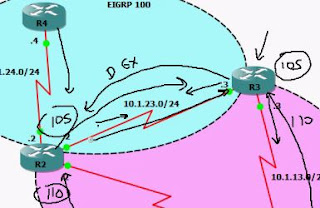
Gotta be careful with advanced route redistribution
So, we want to make sure any tags that we sent out via EIGRP do not come back round in via R3 via OSPF
We already have a route-map (EIGRP-TO-OSPF) in place that is marking the routes and setting the metrics

R2(config)#route-map EIGRP-TO-OSPF deny 5
R2(config-route-map)#match tag 40
R2(config)#route-map OSPF-TO-EIGRP deny 5
R2(config-route-map)#match tag 10 20 30 (when aligned this acts as OR, when on new line, its AND)
So just to clarify;
route-map OSPF-TO-EIGRP, deny, sequence 5
Match clauses:
tag 10 20 30
Set clauses:
Policy routing matches: 0 packets, 0 bytes
route-map OSPF-TO-EIGRP, permit, sequence 10
Match clauses:
Set clauses:
metric 400 20 255 1 1500
tag 40
Lets to do the same on R3
route-map EIGRP-TO-OSPF deny 5
match tag 40
route-map OSPF-TO-EIGRP deny 5
match tag 10 20 30
STEP 5.
R3 has the preferred route to reach the 10.1.0.0/24 network. Ensure routers prefer this path over the path from R2.

Lets check which route R4 currently favours for the 10.1.0.0/24;
R4#traceroute 10.1.0.1
Type escape sequence to abort.
Tracing the route to 10.1.0.1
1 10.1.24.2 4 msec 4 msec 4 msec
2 10.1.12.1 8 msec 4 msec *
As expected we go to R2, then R1
R4 knows about the route via EIGRP from R2:
R4#show ip route 10.1.0.0
Routing entry for 10.1.0.0/24
Known via "eigrp 100", distance 170, metric 6430720
Tag 40, type external
Redistributing via eigrp 100
Last update from 10.1.24.2 on FastEthernet0/0, 00:11:24 ago
Routing Descriptor Blocks:
* 10.1.24.2, from 10.1.24.2, 00:11:24 ago, via FastEthernet0/0
Route metric is 6430720, traffic share count is 1
Total delay is 1200 microseconds, minimum bandwidth is 400 Kbit
Reliability 255/255, minimum MTU 1500 bytes
Loading 1/255, Hops 1
RIGHT, so we have to make the route from R3 look "better" than the route from R2

Looking at the routing tables, R3 has the route 10.1.0.0/24 with an AD of 170
R2 has the route with an AD of 110 ... so even if we were to play with metrics, it still would NOT matter,
One approach is we could lower the Admin Distance of External routes of EIGRP to say 105 (anything below the AD of OSPF which is 110)

Lets try it;
currently R2's route for 10.1.0.0 is
R2#show ip route | i 10.1.0.0
O 10.1.0.0/24 [110/782] via 10.1.12.1, 00:52:01, Serial0/0
R2(config)#router eigrp 100
R2(config-router)#distance eigrp ?
<1-255> Distance for internal routes
R2(config-router)#distance eigrp 90 ? <-- dont need to change internal, keep at default
<1-255> Distance for external routes
R2(config-router)#distance eigrp 90 105
00:55:49: %DUAL-5-NBRCHANGE: IP-EIGRP 100: Neighbor 10.1.24.4 (Ethernet0/0) is down: route configuration changed
00:55:49: %DUAL-5-NBRCHANGE: IP-EIGRP 100: Neighbor 10.1.23.3 (Serial0/1) is down: route configuration changed
00:55:51: %DUAL-5-NBRCHANGE: IP-EIGRP 100: Neighbor 10.1.23.3 (Serial0/1) is up: new adjacency
00:55:53: %DUAL-5-NBRCHANGE: IP-EIGRP 100: Neighbor 10.1.24.4 (Ethernet0/0) is up: new adjacency
SO boys n gals, whadda reckon ......
R2#show ip route | i 10.1.0.0
D EX 10.1.0.0/24 [105/6917120] via 10.1.23.3, 00:02:12, Serial0/1
YEAH BOI!!! check that out! R2 is now favouring the route via R3 with the new Admin Distance of 105, which beats the OSPF AD!
lets check the route on R4 again:
R4#tracerou 10.1.0.1
Type escape sequence to abort.
Tracing the route to 10.1.0.1
1 10.1.24.2 4 msec 4 msec 4 msec
2 10.1.23.3 8 msec 4 msec 4 msec <---- THEREs our bud, R3!!!
3 10.1.13.1 4 msec 4 msec *
NOW! that is kool, very kool, BUT we do have to be careful with and where we make these changes, becuase if say we also go and make this change on R3, we would create ourself an infinite loop! as R3 would prefer R2 over R1 to get to 10.1.0.0/24, the packet would go back over to R2, same thing, it is going to prefer R3 ... and round and round we go! ... although split horizon would prolly kick in, but the point is still valid!

Gotta be careful with advanced route redistribution
Saturday, 26 November 2011
18 - IPv4 Redistribution - Implementing Advanced Redistribution
Lets get basic routing over OSPF and EIGRP, ready for our redistribution (R2 and R3)
STEP 1
R1(config)#router ospf 1
R1(config-router)#network 10.0.0.0 0.255.255.255 area 0
R4(config)#router eigrp 100
R4(config-router)#no auto-summary
R4(config-router)#network 10.0.0.0
R2(config)#router ospf 1
R2(config-router)#network 10.1.12.0 0.0.0.255 area 0
03:51:46: %OSPF-5-ADJCHG: Process 1, Nbr 10.1.0.1 on Serial0/0 from LOADING to FULL, Loading Done
R2(config)#router eigrp 100
R2(config-router)#no auto-summary
R2(config-router)#network 10.1.24.0 0.0.0.255
03:52:54: %DUAL-5-NBRCHANGE: IP-EIGRP 100: Neighbor 10.1.24.4 (Ethernet0/0) is up: new adjacency
R3(config)#router ospf 1
R3(config-router)#network 10.1.13.0 0.0.0.255 area 0
*Mar 1 03:54:04.403: %OSPF-5-ADJCHG: Process 1, Nbr 10.1.0.1 on FastEthernet0/0 from LOADING to FULL, Loading Done
R3(config)#router eigrp 100
R3(config-router)#network 10.1.23.0 255.255.255.0
So Router 2 now sees all routes from both domains:
R2#show ip
10.0.0.0/8 is variably subnetted, 11 subnets, 2 masks
O 10.1.13.0/24 [110/791] via 10.1.12.1, 00:05:04, Serial0/0
C 10.1.12.1/32 is directly connected, Serial0/0
C 10.1.12.0/24 is directly connected, Serial0/0
D 10.4.4.0/24 [90/409600] via 10.1.24.4, 00:06:40, Ethernet0/0
O 10.1.0.0/24 [110/782] via 10.1.12.1, 00:05:04, Serial0/0
D 10.4.2.0/24 [90/409600] via 10.1.24.4, 00:06:40, Ethernet0/0
D 10.4.3.0/24 [90/409600] via 10.1.24.4, 00:06:40, Ethernet0/0
D 10.4.0.0/24 [90/409600] via 10.1.24.4, 00:06:40, Ethernet0/0
D 10.4.1.0/24 [90/409600] via 10.1.24.4, 00:06:40, Ethernet0/0
C 10.1.24.0/24 is directly connected, Ethernet0/0
C 10.1.23.0/24 is directly connected, Serial0/1
STEP 1 COMPLETE
STEP 2
Enable full, mutual redistribution on R2 and R3 between OSPF and EIGRP. The 10.4.0.0/24 and 10.4.1.0/24 subnets should have a seed metric of 100 and an OSPF tag of 10 while the 10.4.2.0/24 and 10.4.3.0/24 subnets should have a seed metric of 200 and an OSPF tag of 20. All other subnets redistributed into OSPF should have a seed metric of 300 and an OSPF tag of 30. OSPF routes redistributed into EIGRP should have a seed metric of BW: 400 DLY: 20 REL: 255 LD: 1 MTU: 1500 and a tag of 40. Finally, external OSPF routes should not increment their metric as they pass through the OSPF domain.
 last part of STEP 2:
external OSPF routes should not increment their metric as they pass through the OSPF domain. - is an E2 route (what we covered in last lab)
SO, best way forward, ACLs with route maps, lets group the networks by what metrics they need and go from there:
R2(config)#ip access-list standard METRIC100
R2(config-std-nacl)#permit 10.4.0.0 0.0.0.255
R2(config-std-nacl)#permit 10.4.1.0 0.0.0.255
R2(config-std-nacl)#ip access-list standard METRIC200
R2(config-std-nacl)#permit 10.4.2.0 0.0.0.255
R2(config-std-nacl)#permit 10.4.3.0 0.0.0.255
R2(config-std-nacl)#ip access-list standard DENY-10.4.4.0
R2(config-std-nacl)#permit 10.4.4.0 0.0.0.255
R2(config)#route-map EIGRP-TO-OSPF
R2(config-route-map)#match ip address METRIC100
R2(config-route-map)#set metric 100
R2(config-route-map)#set tag 10
AWESOME! so lets check that baby out:
R2#show route-map EIGRP-TO-OSPF
route-map EIGRP-TO-OSPF, permit, sequence 10
Match clauses:
ip address (access-lists): METRIC100
Set clauses:
metric 100
tag 10
Policy routing matches: 0 packets, 0 bytes
SWEEET!!!! SOOOO SOOO KOOL!
route-map EIGRP-TO-OSPF permit 20
match ip address METRIC200
set metric 200
set tag 20
route-map EIGRP-TO-OSPF deny 25 <- - DENY THE ACL TRAFFIC.... which we are PERMITTING in the below ACL
match ip address DENY-10.4.4.0
NOTE, Had we of denied the subnet 10.4.4.0/24 in the ACL, we would have needed to use PERMIT in the above sequence 25
GET THIS, if you DENY at the sequence level of the route-map and deny at the ACL too, it permits it! so 2 negatives make a positive! lol, SO rule of thumb (the Jeremy way) keep route-maps at permit and do the denies at the ACL, keeps it simplier.
route-map EIGRP-TO-OSPF permit 30 <- - NO MATCH, so MATCHES EVERYTHING THAT HASN'T ALREADY BEEN MATCHED BY THE PREVIOUS SEQEUENCES!
set metric 300
set tag 30
So the above also takes care of step 3 in our objective;
3. Ensure the 10.4.4.0/24 network does not reach the OSPF routing domain.
SO, we now have our tastey route-map as follows:
route-map EIGRP-TO-OSPF, permit, sequence 10
Match clauses:
ip address (access-lists): METRIC100
Set clauses:
metric 100
tag 10
Policy routing matches: 0 packets, 0 bytes
route-map EIGRP-TO-OSPF, permit, sequence 20
Match clauses:
ip address (access-lists): METRIC200
Set clauses:
metric 200
tag 20
Policy routing matches: 0 packets, 0 bytes
route-map EIGRP-TO-OSPF, deny, sequence 25
Match clauses:
ip address (access-lists): DENY-10.4.4.0
Set clauses:
Policy routing matches: 0 packets, 0 bytes
route-map EIGRP-TO-OSPF, permit, sequence 30
Match clauses:
Set clauses:
metric 300
tag 30
Policy routing matches: 0 packets, 0 bytes
YY-EEE-AAAAH BOI!!!! thats what im talking about!
Lets apply this bad muftha, we need to go under the OSPF process, as this is filtering EIGRP TO OSPF
R2(config)#router ospf 1
R2(config-router)#redistribute eigrp 100 subnets route-map EIGRP-TO-OSPF
DONT need to set metric or tags as that is all down in the route-map, lets check it out on R1!!!
R1#show ip route
10.0.0.0/8 is variably subnetted, 10 subnets, 2 masks
C 10.1.12.2/32 is directly connected, Serial0/0
C 10.1.13.0/24 is directly connected, Ethernet0/0
C 10.1.12.0/24 is directly connected, Serial0/0
C 10.1.0.0/24 is directly connected, Loopback0
O E2 10.4.2.0/24 [110/200] via 10.1.12.2, 00:00:09, Serial0/0
O E2 10.4.3.0/24 [110/200] via 10.1.12.2, 00:00:09, Serial0/0
O E2 10.4.0.0/24 [110/100] via 10.1.12.2, 00:00:09, Serial0/0
O E2 10.4.1.0/24 [110/100] via 10.1.12.2, 00:00:09, Serial0/0
O E2 10.1.24.0/24 [110/300] via 10.1.12.2, 00:00:09, Serial0/0
O E2 10.1.23.0/24 [110/300] via 10.1.12.2, 00:00:09, Serial0/0
SWEEEEEEET! check it out! check out them metrics! and notice the WAN links 10.1.23 & .24.0/24 have the metric of 300!!!
lets check the TAGs (although not doing anything at the mooooo, but) :
R1#show ip route 10.4.2.0
Routing entry for 10.4.2.0/24
Known via "ospf 1", distance 110, metric 200
Tag 20, type extern 2, forward metric 781
Last update from 10.1.12.2 on Serial0/0, 00:05:48 ago
R1#show ip route 10.4.0.0
Routing entry for 10.4.0.0/24
Known via "ospf 1", distance 110, metric 100
Tag 10, type extern 2, forward metric 781
Last update from 10.1.12.2 on Serial0/0, 00:05:32 ago
R1#show ip route 10.1.24.0
Routing entry for 10.1.24.0/24
Known via "ospf 1", distance 110, metric 300
Tag 30, type extern 2, forward metric 781
Last update from 10.1.12.2 on Serial0/0, 00:06:53 ago
Lets apply the same route-map to our other re-distribution router R3;
R3(config)#route-map EIGRP-TO-OSPF permit 10
match ip address METRIC100
set metric 100
set tag 10
!
route-map EIGRP-TO-OSPF permit 20
match ip address METRIC200
set metric 200
set tag 20
!
route-map EIGRP-TO-OSPF deny 25
match ip address DENY-10.4.4.0
!
route-map EIGRP-TO-OSPF permit 30
set metric 300
set tag 30
and apply the ACL's
R3(config)#ip access-list standard DENY-10.4.4.0
permit 10.4.4.0 0.0.0.255
ip access-list standard METRIC100
permit 10.4.0.0 0.0.0.255
permit 10.4.1.0 0.0.0.255
ip access-list standard METRIC200
permit 10.4.2.0 0.0.0.255
permit 10.4.3.0 0.0.0.255
lets check R1 now;
R1#show ip route
10.0.0.0/8 is variably subnetted, 10 subnets, 2 masks
C 10.1.12.2/32 is directly connected, Serial0/0
C 10.1.13.0/24 is directly connected, Ethernet0/0
C 10.1.12.0/24 is directly connected, Serial0/0
C 10.1.0.0/24 is directly connected, Loopback0
O E2 10.4.2.0/24 [110/200] via 10.1.13.3, 00:00:58, Ethernet0/0
O E2 10.4.3.0/24 [110/200] via 10.1.13.3, 00:00:58, Ethernet0/0
O E2 10.4.0.0/24 [110/100] via 10.1.13.3, 00:02:44, Ethernet0/0
O E2 10.4.1.0/24 [110/100] via 10.1.13.3, 00:02:44, Ethernet0/0
O E2 10.1.24.0/24 [110/300] via 10.1.13.3, 00:00:58, Ethernet0/0
O E2 10.1.23.0/24 [110/300] via 10.1.13.3, 00:00:58, Ethernet0/0
SO now, we need to look at redistributing the other way, OSPF --> EIGRP
R2(config)#route-map OSPF-TO-EIGRP
R2(config-route-map)#set metric ? <--NO match needed, this will match ALL
+/-<metric> Add or subtract metric
<0-4294967295> Metric value or Bandwidth in Kbits per second
<cr>
R2(config-route-map)#set metric 400 20 255 1 1500 <--(set all K-Values)
R2(config-route-map)#set tag 40
Apply the route-map to the re-distribution process for OSPF;
R2(config)#router eigrp 100
R2(config-router)#redistribute ospf 1 route-map OSPF-TO-EIGRP
(Apply this route map to R3 as well)
Lets check the routing table of R4;
R4#show ip route
10.0.0.0/8 is variably subnetted, 11 subnets, 2 masks
D EX 10.1.13.0/24 [170/6430720] via 10.1.24.2, 00:01:33, FastEthernet0/0
D EX 10.1.12.1/32 [170/6430720] via 10.1.24.2, 00:01:33, FastEthernet0/0
D EX 10.1.12.0/24 [170/6430720] via 10.1.24.2, 00:01:33, FastEthernet0/0
C 10.4.4.0/24 is directly connected, Loopback4
D EX 10.1.0.0/24 [170/6430720] via 10.1.24.2, 00:01:33, FastEthernet0/0
C 10.4.2.0/24 is directly connected, Loopback2
C 10.4.3.0/24 is directly connected, Loopback3
C 10.4.0.0/24 is directly connected, Loopback0
C 10.4.1.0/24 is directly connected, Loopback1
C 10.1.24.0/24 is directly connected, FastEthernet0/0
D 10.1.23.0/24 [90/2195456] via 10.1.24.2, 01:44:40, FastEthernet0/0
R4#show ip route 10.1.0.0
Routing entry for 10.1.0.0/24
Known via "eigrp 100", distance 170, metric 6430720
Tag 40, type external
Redistributing via eigrp 100
Last update from 10.1.24.2 on FastEthernet0/0, 00:02:07 ago
Routing Descriptor Blocks:
* 10.1.24.2, from 10.1.24.2, 00:02:07 ago, via FastEthernet0/0
Route metric is 6430720, traffic share count is 1
Total delay is 1200 microseconds, minimum bandwidth is 400 Kbit
Reliability 255/255, minimum MTU 1500 bytes
Loading 1/255, Hops 1
R4#show ip route 10.1.12.0
Routing entry for 10.1.12.0/24
Known via "eigrp 100", distance 170, metric 6430720
Tag 40, type external
Redistributing via eigrp 100
Last update from 10.1.24.2 on FastEthernet0/0, 00:04:19 ago
Routing Descriptor Blocks:
* 10.1.24.2, from 10.1.24.2, 00:04:19 ago, via FastEthernet0/0
Route metric is 6430720, traffic share count is 1
Total delay is 1200 microseconds, minimum bandwidth is 400 Kbit
Reliability 255/255, minimum MTU 1500 bytes
Loading 1/255, Hops 1
And the Tags are there tooo
RIGHT, lets take on Step 4 tomorrow:
4. Enable filtering using the assigned route tags to ensure redistributed routes do not cause any looping issues.
Lets get basic routing over OSPF and EIGRP, ready for our redistribution (R2 and R3)
STEP 1
R1(config)#router ospf 1
R1(config-router)#network 10.0.0.0 0.255.255.255 area 0
R4(config)#router eigrp 100
R4(config-router)#no auto-summary
R4(config-router)#network 10.0.0.0
R2(config)#router ospf 1
R2(config-router)#network 10.1.12.0 0.0.0.255 area 0
03:51:46: %OSPF-5-ADJCHG: Process 1, Nbr 10.1.0.1 on Serial0/0 from LOADING to FULL, Loading Done
R2(config)#router eigrp 100
R2(config-router)#no auto-summary
R2(config-router)#network 10.1.24.0 0.0.0.255
03:52:54: %DUAL-5-NBRCHANGE: IP-EIGRP 100: Neighbor 10.1.24.4 (Ethernet0/0) is up: new adjacency
R3(config)#router ospf 1
R3(config-router)#network 10.1.13.0 0.0.0.255 area 0
*Mar 1 03:54:04.403: %OSPF-5-ADJCHG: Process 1, Nbr 10.1.0.1 on FastEthernet0/0 from LOADING to FULL, Loading Done
R3(config)#router eigrp 100
R3(config-router)#network 10.1.23.0 255.255.255.0
So Router 2 now sees all routes from both domains:
R2#show ip
10.0.0.0/8 is variably subnetted, 11 subnets, 2 masks
O 10.1.13.0/24 [110/791] via 10.1.12.1, 00:05:04, Serial0/0
C 10.1.12.1/32 is directly connected, Serial0/0
C 10.1.12.0/24 is directly connected, Serial0/0
D 10.4.4.0/24 [90/409600] via 10.1.24.4, 00:06:40, Ethernet0/0
O 10.1.0.0/24 [110/782] via 10.1.12.1, 00:05:04, Serial0/0
D 10.4.2.0/24 [90/409600] via 10.1.24.4, 00:06:40, Ethernet0/0
D 10.4.3.0/24 [90/409600] via 10.1.24.4, 00:06:40, Ethernet0/0
D 10.4.0.0/24 [90/409600] via 10.1.24.4, 00:06:40, Ethernet0/0
D 10.4.1.0/24 [90/409600] via 10.1.24.4, 00:06:40, Ethernet0/0
C 10.1.24.0/24 is directly connected, Ethernet0/0
C 10.1.23.0/24 is directly connected, Serial0/1
STEP 1 COMPLETE
STEP 2
Enable full, mutual redistribution on R2 and R3 between OSPF and EIGRP. The 10.4.0.0/24 and 10.4.1.0/24 subnets should have a seed metric of 100 and an OSPF tag of 10 while the 10.4.2.0/24 and 10.4.3.0/24 subnets should have a seed metric of 200 and an OSPF tag of 20. All other subnets redistributed into OSPF should have a seed metric of 300 and an OSPF tag of 30. OSPF routes redistributed into EIGRP should have a seed metric of BW: 400 DLY: 20 REL: 255 LD: 1 MTU: 1500 and a tag of 40. Finally, external OSPF routes should not increment their metric as they pass through the OSPF domain.

external OSPF routes should not increment their metric as they pass through the OSPF domain. - is an E2 route (what we covered in last lab)
SO, best way forward, ACLs with route maps, lets group the networks by what metrics they need and go from there:
R2(config)#ip access-list standard METRIC100
R2(config-std-nacl)#permit 10.4.0.0 0.0.0.255
R2(config-std-nacl)#permit 10.4.1.0 0.0.0.255
R2(config-std-nacl)#ip access-list standard METRIC200
R2(config-std-nacl)#permit 10.4.2.0 0.0.0.255
R2(config-std-nacl)#permit 10.4.3.0 0.0.0.255
R2(config-std-nacl)#ip access-list standard DENY-10.4.4.0
R2(config-std-nacl)#permit 10.4.4.0 0.0.0.255
R2(config)#route-map EIGRP-TO-OSPF
R2(config-route-map)#match ip address METRIC100
R2(config-route-map)#set metric 100
R2(config-route-map)#set tag 10
AWESOME! so lets check that baby out:
R2#show route-map EIGRP-TO-OSPF
route-map EIGRP-TO-OSPF, permit, sequence 10
Match clauses:
ip address (access-lists): METRIC100
Set clauses:
metric 100
tag 10
Policy routing matches: 0 packets, 0 bytes
SWEEET!!!! SOOOO SOOO KOOL!
route-map EIGRP-TO-OSPF permit 20
match ip address METRIC200
set metric 200
set tag 20
route-map EIGRP-TO-OSPF deny 25 <- - DENY THE ACL TRAFFIC.... which we are PERMITTING in the below ACL
match ip address DENY-10.4.4.0
NOTE, Had we of denied the subnet 10.4.4.0/24 in the ACL, we would have needed to use PERMIT in the above sequence 25
GET THIS, if you DENY at the sequence level of the route-map and deny at the ACL too, it permits it! so 2 negatives make a positive! lol, SO rule of thumb (the Jeremy way) keep route-maps at permit and do the denies at the ACL, keeps it simplier.
route-map EIGRP-TO-OSPF permit 30 <- - NO MATCH, so MATCHES EVERYTHING THAT HASN'T ALREADY BEEN MATCHED BY THE PREVIOUS SEQEUENCES!
set metric 300
set tag 30
So the above also takes care of step 3 in our objective;
3. Ensure the 10.4.4.0/24 network does not reach the OSPF routing domain.
SO, we now have our tastey route-map as follows:
route-map EIGRP-TO-OSPF, permit, sequence 10
Match clauses:
ip address (access-lists): METRIC100
Set clauses:
metric 100
tag 10
Policy routing matches: 0 packets, 0 bytes
route-map EIGRP-TO-OSPF, permit, sequence 20
Match clauses:
ip address (access-lists): METRIC200
Set clauses:
metric 200
tag 20
Policy routing matches: 0 packets, 0 bytes
route-map EIGRP-TO-OSPF, deny, sequence 25
Match clauses:
ip address (access-lists): DENY-10.4.4.0
Set clauses:
Policy routing matches: 0 packets, 0 bytes
route-map EIGRP-TO-OSPF, permit, sequence 30
Match clauses:
Set clauses:
metric 300
tag 30
Policy routing matches: 0 packets, 0 bytes
YY-EEE-AAAAH BOI!!!! thats what im talking about!
Lets apply this bad muftha, we need to go under the OSPF process, as this is filtering EIGRP TO OSPF
R2(config)#router ospf 1
R2(config-router)#redistribute eigrp 100 subnets route-map EIGRP-TO-OSPF
DONT need to set metric or tags as that is all down in the route-map, lets check it out on R1!!!
R1#show ip route
10.0.0.0/8 is variably subnetted, 10 subnets, 2 masks
C 10.1.12.2/32 is directly connected, Serial0/0
C 10.1.13.0/24 is directly connected, Ethernet0/0
C 10.1.12.0/24 is directly connected, Serial0/0
C 10.1.0.0/24 is directly connected, Loopback0
O E2 10.4.2.0/24 [110/200] via 10.1.12.2, 00:00:09, Serial0/0
O E2 10.4.3.0/24 [110/200] via 10.1.12.2, 00:00:09, Serial0/0
O E2 10.4.0.0/24 [110/100] via 10.1.12.2, 00:00:09, Serial0/0
O E2 10.4.1.0/24 [110/100] via 10.1.12.2, 00:00:09, Serial0/0
O E2 10.1.24.0/24 [110/300] via 10.1.12.2, 00:00:09, Serial0/0
O E2 10.1.23.0/24 [110/300] via 10.1.12.2, 00:00:09, Serial0/0
SWEEEEEEET! check it out! check out them metrics! and notice the WAN links 10.1.23 & .24.0/24 have the metric of 300!!!
lets check the TAGs (although not doing anything at the mooooo, but) :
R1#show ip route 10.4.2.0
Routing entry for 10.4.2.0/24
Known via "ospf 1", distance 110, metric 200
Tag 20, type extern 2, forward metric 781
Last update from 10.1.12.2 on Serial0/0, 00:05:48 ago
R1#show ip route 10.4.0.0
Routing entry for 10.4.0.0/24
Known via "ospf 1", distance 110, metric 100
Tag 10, type extern 2, forward metric 781
Last update from 10.1.12.2 on Serial0/0, 00:05:32 ago
R1#show ip route 10.1.24.0
Routing entry for 10.1.24.0/24
Known via "ospf 1", distance 110, metric 300
Tag 30, type extern 2, forward metric 781
Last update from 10.1.12.2 on Serial0/0, 00:06:53 ago
Lets apply the same route-map to our other re-distribution router R3;
R3(config)#route-map EIGRP-TO-OSPF permit 10
match ip address METRIC100
set metric 100
set tag 10
!
route-map EIGRP-TO-OSPF permit 20
match ip address METRIC200
set metric 200
set tag 20
!
route-map EIGRP-TO-OSPF deny 25
match ip address DENY-10.4.4.0
!
route-map EIGRP-TO-OSPF permit 30
set metric 300
set tag 30
and apply the ACL's
R3(config)#ip access-list standard DENY-10.4.4.0
permit 10.4.4.0 0.0.0.255
ip access-list standard METRIC100
permit 10.4.0.0 0.0.0.255
permit 10.4.1.0 0.0.0.255
ip access-list standard METRIC200
permit 10.4.2.0 0.0.0.255
permit 10.4.3.0 0.0.0.255
lets check R1 now;
R1#show ip route
10.0.0.0/8 is variably subnetted, 10 subnets, 2 masks
C 10.1.12.2/32 is directly connected, Serial0/0
C 10.1.13.0/24 is directly connected, Ethernet0/0
C 10.1.12.0/24 is directly connected, Serial0/0
C 10.1.0.0/24 is directly connected, Loopback0
O E2 10.4.2.0/24 [110/200] via 10.1.13.3, 00:00:58, Ethernet0/0
O E2 10.4.3.0/24 [110/200] via 10.1.13.3, 00:00:58, Ethernet0/0
O E2 10.4.0.0/24 [110/100] via 10.1.13.3, 00:02:44, Ethernet0/0
O E2 10.4.1.0/24 [110/100] via 10.1.13.3, 00:02:44, Ethernet0/0
O E2 10.1.24.0/24 [110/300] via 10.1.13.3, 00:00:58, Ethernet0/0
O E2 10.1.23.0/24 [110/300] via 10.1.13.3, 00:00:58, Ethernet0/0
SO now, we need to look at redistributing the other way, OSPF --> EIGRP
R2(config)#route-map OSPF-TO-EIGRP
R2(config-route-map)#set metric ? <--NO match needed, this will match ALL
+/-<metric> Add or subtract metric
<0-4294967295> Metric value or Bandwidth in Kbits per second
<cr>
R2(config-route-map)#set metric 400 20 255 1 1500 <--(set all K-Values)
R2(config-route-map)#set tag 40
Apply the route-map to the re-distribution process for OSPF;
R2(config)#router eigrp 100
R2(config-router)#redistribute ospf 1 route-map OSPF-TO-EIGRP
(Apply this route map to R3 as well)
Lets check the routing table of R4;
R4#show ip route
10.0.0.0/8 is variably subnetted, 11 subnets, 2 masks
D EX 10.1.13.0/24 [170/6430720] via 10.1.24.2, 00:01:33, FastEthernet0/0
D EX 10.1.12.1/32 [170/6430720] via 10.1.24.2, 00:01:33, FastEthernet0/0
D EX 10.1.12.0/24 [170/6430720] via 10.1.24.2, 00:01:33, FastEthernet0/0
C 10.4.4.0/24 is directly connected, Loopback4
D EX 10.1.0.0/24 [170/6430720] via 10.1.24.2, 00:01:33, FastEthernet0/0
C 10.4.2.0/24 is directly connected, Loopback2
C 10.4.3.0/24 is directly connected, Loopback3
C 10.4.0.0/24 is directly connected, Loopback0
C 10.4.1.0/24 is directly connected, Loopback1
C 10.1.24.0/24 is directly connected, FastEthernet0/0
D 10.1.23.0/24 [90/2195456] via 10.1.24.2, 01:44:40, FastEthernet0/0
R4#show ip route 10.1.0.0
Routing entry for 10.1.0.0/24
Known via "eigrp 100", distance 170, metric 6430720
Tag 40, type external
Redistributing via eigrp 100
Last update from 10.1.24.2 on FastEthernet0/0, 00:02:07 ago
Routing Descriptor Blocks:
* 10.1.24.2, from 10.1.24.2, 00:02:07 ago, via FastEthernet0/0
Route metric is 6430720, traffic share count is 1
Total delay is 1200 microseconds, minimum bandwidth is 400 Kbit
Reliability 255/255, minimum MTU 1500 bytes
Loading 1/255, Hops 1
R4#show ip route 10.1.12.0
Routing entry for 10.1.12.0/24
Known via "eigrp 100", distance 170, metric 6430720
Tag 40, type external
Redistributing via eigrp 100
Last update from 10.1.24.2 on FastEthernet0/0, 00:04:19 ago
Routing Descriptor Blocks:
* 10.1.24.2, from 10.1.24.2, 00:04:19 ago, via FastEthernet0/0
Route metric is 6430720, traffic share count is 1
Total delay is 1200 microseconds, minimum bandwidth is 400 Kbit
Reliability 255/255, minimum MTU 1500 bytes
Loading 1/255, Hops 1
And the Tags are there tooo
RIGHT, lets take on Step 4 tomorrow:
4. Enable filtering using the assigned route tags to ensure redistributed routes do not cause any looping issues.
Friday, 25 November 2011
Nugget 17
IPv4 Redistribution - Implementing Simple Redistribution Steps 3 & 4
Lets crack on with the next step now steps 1 & 2 are complete;
Step 3.
Implement distribute-list filtering in such a way that the OSPF domain only sees odd numbered loopback networks coming from R1. Any even numbered subnet (including physical networks) should be hidden from OSPF.
So looking at the diagram again, we are going to need to advertise the follow loopbacks only to OSPF:
Advertise the ODD Routes
10.1.1.0/24
10.1.3.0/24
10.1.5.0/24
BUT hide the EVEN routes:
10.1.0.0/24
10.1.2.0/24
10.1.4.0/24
10.1.6.0/24
and including the physical interface;
10.1.12.0/24
Lets create an ACL that the distribution-list can use (always try and give a descriptive name to the ACL so we know what it does!):
R2(config)#ip access-list standard ODD-OSPF-NETWORKS
R2(config-std-nacl)#permit 10.1.1.0 0.0.0.255
R2(config-std-nacl)#permit 10.1.3.0 0.0.0.255
R2(config-std-nacl)#permit 10.1.5.0 0.0.0.255
Lets apply the ACL so it actually does something, this is done under the OSPF process;
R2(config-std-nacl)#router ospf 1
R2(config-router)#distribute-list ODD-OSPF-NETWORKS ?
in Filter incoming routing updates
out Filter outgoing routing updates
So the direction is key here, this is done from router2's perspective, so we want to filter the routes we advertise OUT to R3

So now we know the direction, lets check the routes we can see on R3 before we apply the distribution-list;
R3#show ip route
10.0.0.0/8 is variably subnetted, 17 subnets, 3 masks
C 10.1.11.0/30 is directly connected, Loopback11
C 10.1.10.0/24 is directly connected, Loopback10
C 10.1.9.0/24 is directly connected, Loopback9
C 10.1.8.0/24 is directly connected, Loopback8
C 10.1.11.4/30 is directly connected, Loopback12
O E2 10.1.12.1/32 [110/100] via 10.1.23.2, 00:59:49, Serial1/0
O E2 10.1.12.0/24 [110/100] via 10.1.23.2, 00:59:49, Serial1/0
O E2 10.1.3.0/24 [110/100] via 10.1.23.2, 00:59:49, Serial1/0
C 10.1.11.8/30 is directly connected, Loopback13
C 10.1.2.0/24 is directly connected, FastEthernet0/0
O E2 10.1.1.0/24 [110/100] via 10.1.23.2, 00:59:49, Serial1/0
O E2 10.1.0.0/24 [110/100] via 10.1.23.2, 00:59:49, Serial1/0
C 10.1.7.0/24 is directly connected, Loopback7
O E2 10.1.6.0/24 [110/100] via 10.1.23.2, 00:59:49, Serial1/0
O E2 10.1.5.0/24 [110/100] via 10.1.23.2, 00:59:49, Serial1/0
O E2 10.1.4.0/24 [110/100] via 10.1.23.2, 00:59:49, Serial1/0
C 10.1.23.0/24 is directly connected, Serial1/0
So notice we have even and off routes being seen in OSPF, lets apply the distribution list;
R2(config-std-nacl)#router ospf 1
R2(config-router)#distribute-list ODD-OSPF-NETWORKS out
I'm all excited!! lets jump over and check R3!!!;
R3#show ip route
10.0.0.0/8 is variably subnetted, 12 subnets, 2 masks
C 10.1.11.0/30 is directly connected, Loopback11
C 10.1.10.0/24 is directly connected, Loopback10
C 10.1.9.0/24 is directly connected, Loopback9
C 10.1.8.0/24 is directly connected, Loopback8
C 10.1.11.4/30 is directly connected, Loopback12
O E2 10.1.3.0/24 [110/100] via 10.1.23.2, 01:07:10, Serial1/0
C 10.1.11.8/30 is directly connected, Loopback13
C 10.1.2.0/24 is directly connected, FastEthernet0/0
O E2 10.1.1.0/24 [110/100] via 10.1.23.2, 01:07:10, Serial1/0
C 10.1.7.0/24 is directly connected, Loopback7
O E2 10.1.5.0/24 [110/100] via 10.1.23.2, 01:07:10, Serial1/0
C 10.1.23.0/24 is directly connected, Serial1/0
SWEEEET! sure enough we are now only seeing the ODD numbered subnets from the EIGRP domain :0)
STEP 3 COMPLETE
P.S
R2#show ip access-list ODD-OSPF-NETWORKS
Standard IP access list ODD-OSPF-NETWORKS
permit 10.1.1.0, wildcard bits 0.0.0.255 (1 match)<----
permit 10.1.3.0, wildcard bits 0.0.0.255 (1 match)<----
permit 10.1.5.0, wildcard bits 0.0.0.255 (1 match)<---- YEAH BOI!
4. Implement route-map filtering in such a way that the EIGRP domain does not see routes with a more specific subnet mask than /24.
SO we could just accomplish this with an ACL and specify the /24 routes only are permitted, but thats boring, we are going to check out prefix-lists!
So prefix lists are here to help us get very specific with subnetmasks with route filtering and BGP, however we can also them to apply to route redistribution (remember to give them a meaning name, just like the ACLs)
So prefix lists work by given the prefix-list a name, they i would like to permit/deny the general network and mask, then we allow the specific mask;
R2(config)#ip prefix-list /24-MASK permit 10.0.0.0/8 ?
ge Minimum prefix length to be matched
le Maximum prefix length to be matched
<cr>
SO if i was to press enter now, it would only allow JUST that mask 10.0.0.0/8 (Class A), so we would be denying pretty much everything, including the WAN links (the name of the prefix-list is /24-MASK)
R2(config)#ip prefix-list /24-MASK permit 10.0.0.0/8 le 24
So the above command (as an example, lets say a route of 10.1.7.0/24 comes into the router2, the router will check the prefix-list and check that it belongs to the 10. network (Class A 10.0.0.0/8), which it does, next it will see if it is LESS than or equal to /24, in this case, yes it is equal to /24, the router PERMITs the route to pass over to the other side.
HOWEVER the 10.1.11.8/30 is not LESS than /24, it is GREATER than a /24, so he is denied.
R2(config)#ip prefix-list /24-MASK permit 10.0.0.0/8 le 24
So its kind of a range really, from the 10.0.0.0/8 ------> le or ge /24 or /30 Soooo you can do this;
R2(config)#ip prefix-list /24-MASK permit 10.0.0.0/8 ge /16 le /24
how kool is that, so we can really pin down what subnets are allowed, between a range!
SO know we can create a route map which can use the prefix-list, as the route-map is pretty much if and then statements, but they are actually called match and set, your'll see:
R2(config)#route-map FILTER_OSPF_TO_EIGRP
R2(config-route-map)#match ip address prefix-list /24-MASK
R2#show route-map FILTER_OSPF_TO_EIGRP
route-map FILTER_OSPF_TO_EIGRP, permit, sequence 10
Match clauses:
ip address prefix-lists: /24-MASK
Set clauses:
Policy routing matches: 0 packets, 0 bytes
So the route-map is permitting (thats the default) anything that matches the prefix-list /24-MASK
NOW the kool part, we need to go under the EIGRP process and apply it to the re-distribution!
But first, lets just check the routes that R1 can see now
R1#show ip route
10.0.0.0/8 is variably subnetted, 17 subnets, 3 masks
D EX 10.1.11.0/30 [170/26137600] via 10.1.12.2, 01:45:44, Serial0/0
D EX 10.1.10.0/24 [170/26137600] via 10.1.12.2, 01:45:44, Serial0/0
D EX 10.1.9.0/24 [170/26137600] via 10.1.12.2, 01:45:44, Serial0/0
D EX 10.1.8.0/24 [170/26137600] via 10.1.12.2, 01:45:44, Serial0/0
D EX 10.1.11.4/30 [170/26137600] via 10.1.12.2, 01:45:44, Serial0/0
C 10.1.12.2/32 is directly connected, Serial0/0
C 10.1.12.0/24 is directly connected, Serial0/0
D EX 10.1.11.8/30 [170/26137600] via 10.1.12.2, 01:45:44, Serial0/0
C 10.1.3.0/24 is directly connected, Loopback3
C 10.1.2.0/24 is directly connected, Ethernet0/0
C 10.1.1.0/24 is directly connected, Loopback1
C 10.1.0.0/24 is directly connected, Loopback0
D EX 10.1.7.0/24 [170/26137600] via 10.1.12.2, 01:45:44, Serial0/0
C 10.1.6.0/24 is directly connected, Loopback6
C 10.1.5.0/24 is directly connected, Loopback5
C 10.1.4.0/24 is directly connected, Loopback4
D EX 10.1.23.0/24 [170/26137600] via 10.1.12.2, 01:46:01, Serial0/0
R2(config)#router eigrp 100
R2(config-router)#redistribute ospf 1 metric 100 100 100 100 100 route-map FILTER_OSPF_TO_EIGRP
R1#show ip route
10.0.0.0/8 is variably subnetted, 14 subnets, 2 masks
D EX 10.1.10.0/24 [170/26137600] via 10.1.12.2, 01:47:23, Serial0/0
D EX 10.1.9.0/24 [170/26137600] via 10.1.12.2, 01:47:23, Serial0/0
D EX 10.1.8.0/24 [170/26137600] via 10.1.12.2, 01:47:23, Serial0/0
C 10.1.12.2/32 is directly connected, Serial0/0
C 10.1.12.0/24 is directly connected, Serial0/0
C 10.1.3.0/24 is directly connected, Loopback3
C 10.1.2.0/24 is directly connected, Ethernet0/0
C 10.1.1.0/24 is directly connected, Loopback1
C 10.1.0.0/24 is directly connected, Loopback0
D EX 10.1.7.0/24 [170/26137600] via 10.1.12.2, 01:47:23, Serial0/0
C 10.1.6.0/24 is directly connected, Loopback6
C 10.1.5.0/24 is directly connected, Loopback5
C 10.1.4.0/24 is directly connected, Loopback4
D EX 10.1.23.0/24 [170/26137600] via 10.1.12.2, 01:47:39, Serial0/0
YAYE! it works! only the /24's subnets are showing
SO to confirm and clarify;
R2#show route-map FILTER_OSPF_TO_EIGRP
route-map FILTER_OSPF_TO_EIGRP, permit, sequence 10
Match clauses:
ip address prefix-lists: /24-MASK
Set clauses:
Policy routing matches: 0 packets, 0 bytes <-- wont see matching as we are not performing policy routing(yet)
R2#show ip prefix-list /24-MASK
ip prefix-list /24-MASK: 1 entries
seq 5 permit 10.0.0.0/8 le 24
NUGGET COMPLETE, ROLL on the advanced lab!
IPv4 Redistribution - Implementing Simple Redistribution Steps 3 & 4
Lets crack on with the next step now steps 1 & 2 are complete;
Step 3.
Implement distribute-list filtering in such a way that the OSPF domain only sees odd numbered loopback networks coming from R1. Any even numbered subnet (including physical networks) should be hidden from OSPF.
So looking at the diagram again, we are going to need to advertise the follow loopbacks only to OSPF:
Advertise the ODD Routes
10.1.1.0/24
10.1.3.0/24
10.1.5.0/24
BUT hide the EVEN routes:
10.1.0.0/24
10.1.2.0/24
10.1.4.0/24
10.1.6.0/24
and including the physical interface;
10.1.12.0/24
Lets create an ACL that the distribution-list can use (always try and give a descriptive name to the ACL so we know what it does!):
R2(config)#ip access-list standard ODD-OSPF-NETWORKS
R2(config-std-nacl)#permit 10.1.1.0 0.0.0.255
R2(config-std-nacl)#permit 10.1.3.0 0.0.0.255
R2(config-std-nacl)#permit 10.1.5.0 0.0.0.255
Lets apply the ACL so it actually does something, this is done under the OSPF process;
R2(config-std-nacl)#router ospf 1
R2(config-router)#distribute-list ODD-OSPF-NETWORKS ?
in Filter incoming routing updates
out Filter outgoing routing updates
So the direction is key here, this is done from router2's perspective, so we want to filter the routes we advertise OUT to R3
So now we know the direction, lets check the routes we can see on R3 before we apply the distribution-list;
R3#show ip route
10.0.0.0/8 is variably subnetted, 17 subnets, 3 masks
C 10.1.11.0/30 is directly connected, Loopback11
C 10.1.10.0/24 is directly connected, Loopback10
C 10.1.9.0/24 is directly connected, Loopback9
C 10.1.8.0/24 is directly connected, Loopback8
C 10.1.11.4/30 is directly connected, Loopback12
O E2 10.1.12.1/32 [110/100] via 10.1.23.2, 00:59:49, Serial1/0
O E2 10.1.12.0/24 [110/100] via 10.1.23.2, 00:59:49, Serial1/0
O E2 10.1.3.0/24 [110/100] via 10.1.23.2, 00:59:49, Serial1/0
C 10.1.11.8/30 is directly connected, Loopback13
C 10.1.2.0/24 is directly connected, FastEthernet0/0
O E2 10.1.1.0/24 [110/100] via 10.1.23.2, 00:59:49, Serial1/0
O E2 10.1.0.0/24 [110/100] via 10.1.23.2, 00:59:49, Serial1/0
C 10.1.7.0/24 is directly connected, Loopback7
O E2 10.1.6.0/24 [110/100] via 10.1.23.2, 00:59:49, Serial1/0
O E2 10.1.5.0/24 [110/100] via 10.1.23.2, 00:59:49, Serial1/0
O E2 10.1.4.0/24 [110/100] via 10.1.23.2, 00:59:49, Serial1/0
C 10.1.23.0/24 is directly connected, Serial1/0
So notice we have even and off routes being seen in OSPF, lets apply the distribution list;
R2(config-std-nacl)#router ospf 1
R2(config-router)#distribute-list ODD-OSPF-NETWORKS out
I'm all excited!! lets jump over and check R3!!!;
R3#show ip route
10.0.0.0/8 is variably subnetted, 12 subnets, 2 masks
C 10.1.11.0/30 is directly connected, Loopback11
C 10.1.10.0/24 is directly connected, Loopback10
C 10.1.9.0/24 is directly connected, Loopback9
C 10.1.8.0/24 is directly connected, Loopback8
C 10.1.11.4/30 is directly connected, Loopback12
O E2 10.1.3.0/24 [110/100] via 10.1.23.2, 01:07:10, Serial1/0
C 10.1.11.8/30 is directly connected, Loopback13
C 10.1.2.0/24 is directly connected, FastEthernet0/0
O E2 10.1.1.0/24 [110/100] via 10.1.23.2, 01:07:10, Serial1/0
C 10.1.7.0/24 is directly connected, Loopback7
O E2 10.1.5.0/24 [110/100] via 10.1.23.2, 01:07:10, Serial1/0
C 10.1.23.0/24 is directly connected, Serial1/0
SWEEEET! sure enough we are now only seeing the ODD numbered subnets from the EIGRP domain :0)
STEP 3 COMPLETE
P.S
R2#show ip access-list ODD-OSPF-NETWORKS
Standard IP access list ODD-OSPF-NETWORKS
permit 10.1.1.0, wildcard bits 0.0.0.255 (1 match)<----
permit 10.1.3.0, wildcard bits 0.0.0.255 (1 match)<----
permit 10.1.5.0, wildcard bits 0.0.0.255 (1 match)<---- YEAH BOI!
4. Implement route-map filtering in such a way that the EIGRP domain does not see routes with a more specific subnet mask than /24.
SO we could just accomplish this with an ACL and specify the /24 routes only are permitted, but thats boring, we are going to check out prefix-lists!
So prefix lists are here to help us get very specific with subnetmasks with route filtering and BGP, however we can also them to apply to route redistribution (remember to give them a meaning name, just like the ACLs)
So prefix lists work by given the prefix-list a name, they i would like to permit/deny the general network and mask, then we allow the specific mask;
R2(config)#ip prefix-list /24-MASK permit 10.0.0.0/8 ?
ge Minimum prefix length to be matched
le Maximum prefix length to be matched
<cr>
SO if i was to press enter now, it would only allow JUST that mask 10.0.0.0/8 (Class A), so we would be denying pretty much everything, including the WAN links (the name of the prefix-list is /24-MASK)
R2(config)#ip prefix-list /24-MASK permit 10.0.0.0/8 le 24
So the above command (as an example, lets say a route of 10.1.7.0/24 comes into the router2, the router will check the prefix-list and check that it belongs to the 10. network (Class A 10.0.0.0/8), which it does, next it will see if it is LESS than or equal to /24, in this case, yes it is equal to /24, the router PERMITs the route to pass over to the other side.
HOWEVER the 10.1.11.8/30 is not LESS than /24, it is GREATER than a /24, so he is denied.
R2(config)#ip prefix-list /24-MASK permit 10.0.0.0/8 le 24
So its kind of a range really, from the 10.0.0.0/8 ------> le or ge /24 or /30 Soooo you can do this;
R2(config)#ip prefix-list /24-MASK permit 10.0.0.0/8 ge /16 le /24
how kool is that, so we can really pin down what subnets are allowed, between a range!
SO know we can create a route map which can use the prefix-list, as the route-map is pretty much if and then statements, but they are actually called match and set, your'll see:
R2(config)#route-map FILTER_OSPF_TO_EIGRP
R2(config-route-map)#match ip address prefix-list /24-MASK
R2#show route-map FILTER_OSPF_TO_EIGRP
route-map FILTER_OSPF_TO_EIGRP, permit, sequence 10
Match clauses:
ip address prefix-lists: /24-MASK
Set clauses:
Policy routing matches: 0 packets, 0 bytes
So the route-map is permitting (thats the default) anything that matches the prefix-list /24-MASK
NOW the kool part, we need to go under the EIGRP process and apply it to the re-distribution!
But first, lets just check the routes that R1 can see now
R1#show ip route
10.0.0.0/8 is variably subnetted, 17 subnets, 3 masks
D EX 10.1.11.0/30 [170/26137600] via 10.1.12.2, 01:45:44, Serial0/0
D EX 10.1.10.0/24 [170/26137600] via 10.1.12.2, 01:45:44, Serial0/0
D EX 10.1.9.0/24 [170/26137600] via 10.1.12.2, 01:45:44, Serial0/0
D EX 10.1.8.0/24 [170/26137600] via 10.1.12.2, 01:45:44, Serial0/0
D EX 10.1.11.4/30 [170/26137600] via 10.1.12.2, 01:45:44, Serial0/0
C 10.1.12.2/32 is directly connected, Serial0/0
C 10.1.12.0/24 is directly connected, Serial0/0
D EX 10.1.11.8/30 [170/26137600] via 10.1.12.2, 01:45:44, Serial0/0
C 10.1.3.0/24 is directly connected, Loopback3
C 10.1.2.0/24 is directly connected, Ethernet0/0
C 10.1.1.0/24 is directly connected, Loopback1
C 10.1.0.0/24 is directly connected, Loopback0
D EX 10.1.7.0/24 [170/26137600] via 10.1.12.2, 01:45:44, Serial0/0
C 10.1.6.0/24 is directly connected, Loopback6
C 10.1.5.0/24 is directly connected, Loopback5
C 10.1.4.0/24 is directly connected, Loopback4
D EX 10.1.23.0/24 [170/26137600] via 10.1.12.2, 01:46:01, Serial0/0
R2(config)#router eigrp 100
R2(config-router)#redistribute ospf 1 metric 100 100 100 100 100 route-map FILTER_OSPF_TO_EIGRP
R1#show ip route
10.0.0.0/8 is variably subnetted, 14 subnets, 2 masks
D EX 10.1.10.0/24 [170/26137600] via 10.1.12.2, 01:47:23, Serial0/0
D EX 10.1.9.0/24 [170/26137600] via 10.1.12.2, 01:47:23, Serial0/0
D EX 10.1.8.0/24 [170/26137600] via 10.1.12.2, 01:47:23, Serial0/0
C 10.1.12.2/32 is directly connected, Serial0/0
C 10.1.12.0/24 is directly connected, Serial0/0
C 10.1.3.0/24 is directly connected, Loopback3
C 10.1.2.0/24 is directly connected, Ethernet0/0
C 10.1.1.0/24 is directly connected, Loopback1
C 10.1.0.0/24 is directly connected, Loopback0
D EX 10.1.7.0/24 [170/26137600] via 10.1.12.2, 01:47:23, Serial0/0
C 10.1.6.0/24 is directly connected, Loopback6
C 10.1.5.0/24 is directly connected, Loopback5
C 10.1.4.0/24 is directly connected, Loopback4
D EX 10.1.23.0/24 [170/26137600] via 10.1.12.2, 01:47:39, Serial0/0
YAYE! it works! only the /24's subnets are showing
SO to confirm and clarify;
R2#show route-map FILTER_OSPF_TO_EIGRP
route-map FILTER_OSPF_TO_EIGRP, permit, sequence 10
Match clauses:
ip address prefix-lists: /24-MASK
Set clauses:
Policy routing matches: 0 packets, 0 bytes <-- wont see matching as we are not performing policy routing(yet)
R2#show ip prefix-list /24-MASK
ip prefix-list /24-MASK: 1 entries
seq 5 permit 10.0.0.0/8 le 24
NUGGET COMPLETE, ROLL on the advanced lab!
Thursday, 24 November 2011
17 - IPv4 Redistribution - Implementing Simple Redistribution

I have already setup the lab (done this the other night, basic IP connectivity as per above)
Lets break down step 1 and configure EIGRP and OSPF on the respective routers;
R1(config)#router eigrp 100
R1(config-router)#network 10.0.0.0
R1(config-router)#no auto-summary
R2(config)#router eigrp 100
R2(config-router)#network 10.1.12.0 0.0.0.255
R2(config-router)#no auto-summary
00:06:27: %DUAL-5-NBRCHANGE: IP-EIGRP 100: Neighbor 10.1.12.1 (Serial0/0) is up: new adjacency
R2(config)#router ospf 1
R2(config-router)#network 10.1.23.0 0.0.0.255 area 0
R3(config)#router ospf 1
R3(config-router)#networ 10.0.0.0 0.255.255.255 area 0
*Mar 1 00:11:30.395: %OSPF-5-ADJCHG: Process 1, Nbr 10.1.23.2 on Serial1/0 from LOADING to FULL, Loading Done
So router2 should now show both EIGRP and OSPF routes;
R2#show ip route
10.0.0.0/8 is variably subnetted, 16 subnets, 2 masks
O 10.1.10.1/32 [110/65] via 10.1.23.3, 00:00:06, Serial0/1
O 10.1.11.1/32 [110/65] via 10.1.23.3, 00:00:06, Serial0/1
O 10.1.8.1/32 [110/65] via 10.1.23.3, 00:00:06, Serial0/1
O 10.1.9.1/32 [110/65] via 10.1.23.3, 00:00:06, Serial0/1
O 10.1.11.5/32 [110/65] via 10.1.23.3, 00:00:06, Serial0/1
C 10.1.12.1/32 is directly connected, Serial0/0
C 10.1.12.0/24 is directly connected, Serial0/0
D 10.1.3.0/24 [90/20640000] via 10.1.12.1, 00:11:53, Serial0/0
D 10.1.2.0/24 [90/20537600] via 10.1.12.1, 00:11:53, Serial0/0
D 10.1.1.0/24 [90/20640000] via 10.1.12.1, 00:11:53, Serial0/0
D 10.1.0.0/24 [90/20640000] via 10.1.12.1, 00:11:53, Serial0/0
O 10.1.7.1/32 [110/65] via 10.1.23.3, 00:00:06, Serial0/1
D 10.1.6.0/24 [90/20640000] via 10.1.12.1, 00:11:53, Serial0/0
D 10.1.5.0/24 [90/20640000] via 10.1.12.1, 00:11:53, Serial0/0
D 10.1.4.0/24 [90/20640000] via 10.1.12.1, 00:11:53, Serial0/0
C 10.1.23.0/24 is directly connected, Serial0/1
Lets just tweak the serial point-to-point links
R3(config-if)#int loopback7
R3(config-if)#ip ospf network point-to-point
R3(config-if)#int loopback8
R3(config-if)#ip ospf network point-to-point
R3(config-if)#int loopback9
R3(config-if)#ip ospf network point-to-point
R3(config-if)#int loopback10
R3(config-if)#ip ospf network point-to-point
R3(config-if)#int loopback11
R3(config-if)#ip ospf network point-to-point
R3(config-if)#int loopback12
R3(config-if)#ip ospf network point-to-point
R3(config-if)#int loopback13
R3(config-if)#ip ospf network point-to-point
Thats better now the loopbacks look like real point-to-point links instead of that /32 host mask
R2#show ip route
10.0.0.0/8 is variably subnetted, 17 subnets, 3 masks
O 10.1.11.0/30 [110/65] via 10.1.23.3, 00:01:41, Serial0/1
O 10.1.10.0/24 [110/65] via 10.1.23.3, 00:01:41, Serial0/1
O 10.1.9.0/24 [110/65] via 10.1.23.3, 00:01:41, Serial0/1
O 10.1.8.0/24 [110/65] via 10.1.23.3, 00:01:41, Serial0/1
O 10.1.11.4/30 [110/65] via 10.1.23.3, 00:01:41, Serial0/1
C 10.1.12.1/32 is directly connected, Serial0/0
C 10.1.12.0/24 is directly connected, Serial0/0
O 10.1.11.8/30 [110/65] via 10.1.23.3, 00:01:41, Serial0/1
D 10.1.3.0/24 [90/20640000] via 10.1.12.1, 00:16:37, Serial0/0
D 10.1.2.0/24 [90/20537600] via 10.1.12.1, 00:16:37, Serial0/0
D 10.1.1.0/24 [90/20640000] via 10.1.12.1, 00:16:37, Serial0/0
D 10.1.0.0/24 [90/20640000] via 10.1.12.1, 00:16:37, Serial0/0
O 10.1.7.0/24 [110/65] via 10.1.23.3, 00:01:41, Serial0/1
D 10.1.6.0/24 [90/20640000] via 10.1.12.1, 00:16:37, Serial0/0
D 10.1.5.0/24 [90/20640000] via 10.1.12.1, 00:16:37, Serial0/0
D 10.1.4.0/24 [90/20640000] via 10.1.12.1, 00:16:37, Serial0/0
C 10.1.23.0/24 is directly connected, Serial0/1

The problem we have with this is loosing the metric, both EIGRP and OSPF have totally different metrics:
OSPF = cost
EIGRP = composite of bandwidth and delay
As shown above RIP and EIGRP networks when distributed have an infinite metric by default
So OSPF will never see this routes as they are "unreachable" (ill prove this in abit)
OSPF networks have a default metric of 20 when distributed, BGP is whatever it was when you redistributed from the internal network (stays the same)
NOW, lets start with getting them EIGRP routes into OSPF, for this we have to go under the OSPF process;
R2(config)#router ospf 1
R2(config-router)#redistribute eigrp 100 ?
metric Metric for redistributed routes
metric-type OSPF/IS-IS exterior metric type for redistributed routes
route-map Route map reference
subnets Consider subnets for redistribution into OSPF
tag Set tag for routes redistributed into OSPF
<cr>
Now by default, when we do redistribution it will try and summarise the networks (which if you recall from our instructions we are not allowed to do)
SO we can use the "subnets" commands to keep their subnet class, rather than be summarised back to their orginal classful networks
If i miss off the subnet command (you are prompted this fact)
R2(config-router)#redistribute eigrp 100
% Only classful networks will be redistributed
R2(config-router)#redistribute eigrp 100 subnets
R3#show ip route
10.0.0.0/8 is variably subnetted, 17 subnets, 3 masks
C 10.1.11.0/30 is directly connected, Loopback11
C 10.1.10.0/24 is directly connected, Loopback10
C 10.1.9.0/24 is directly connected, Loopback9
C 10.1.8.0/24 is directly connected, Loopback8
C 10.1.11.4/30 is directly connected, Loopback12
O E2 10.1.12.1/32 [110/20] via 10.1.23.2, 00:00:18, Serial1/0
O E2 10.1.12.0/24 [110/20] via 10.1.23.2, 00:00:18, Serial1/0
O E2 10.1.3.0/24 [110/20] via 10.1.23.2, 00:00:18, Serial1/0
C 10.1.11.8/30 is directly connected, Loopback13
C 10.1.2.0/24 is directly connected, FastEthernet0/0
O E2 10.1.1.0/24 [110/20] via 10.1.23.2, 00:00:18, Serial1/0
O E2 10.1.0.0/24 [110/20] via 10.1.23.2, 00:00:18, Serial1/0
C 10.1.7.0/24 is directly connected, Loopback7
O E2 10.1.6.0/24 [110/20] via 10.1.23.2, 00:00:18, Serial1/0
O E2 10.1.5.0/24 [110/20] via 10.1.23.2, 00:00:18, Serial1/0
O E2 10.1.4.0/24 [110/20] via 10.1.23.2, 00:00:18, Serial1/0
C 10.1.23.0/24 is directly connected, Serial1/0
NOTICE by default the routes come thru as E2 routes "E2 - OSPF external type 2"
E1 = These incriment their metric
E2 = these dont
NOTE:
If we want to change this can do via:
R2(config-router)#redistribute eigrp 100 subnets metric-type ?
1 Set OSPF External Type 1 metrics
2 Set OSPF External Type 2 metrics <- - DEFAULT (wont show under OSPF, its default)
SO if this works, great, if not we can change the metric by this command;
R2(config)#router ospf 1
R2(config-router)#redistribute eigrp 100 subnets metric 100
This now sets any redistributed routes via EIGRP to a new default metric of 100 NOT 20 (as they are E2 routes)
R3#show ip route
Gateway of last resort is not set
10.0.0.0/8 is variably subnetted, 17 subnets, 3 masks
C 10.1.11.0/30 is directly connected, Loopback11
C 10.1.10.0/24 is directly connected, Loopback10
C 10.1.9.0/24 is directly connected, Loopback9
C 10.1.8.0/24 is directly connected, Loopback8
C 10.1.11.4/30 is directly connected, Loopback12
O E2 10.1.12.1/32 [110/100] via 10.1.23.2, 00:00:10, Serial1/0
O E2 10.1.12.0/24 [110/100] via 10.1.23.2, 00:00:10, Serial1/0
O E2 10.1.3.0/24 [110/100] via 10.1.23.2, 00:00:10, Serial1/0
C 10.1.11.8/30 is directly connected, Loopback13
C 10.1.2.0/24 is directly connected, FastEthernet0/0
O E2 10.1.1.0/24 [110/100] via 10.1.23.2, 00:00:10, Serial1/0
O E2 10.1.0.0/24 [110/100] via 10.1.23.2, 00:00:10, Serial1/0
C 10.1.7.0/24 is directly connected, Loopback7
O E2 10.1.6.0/24 [110/100] via 10.1.23.2, 00:00:10, Serial1/0
O E2 10.1.5.0/24 [110/100] via 10.1.23.2, 00:00:10, Serial1/0
O E2 10.1.4.0/24 [110/100] via 10.1.23.2, 00:00:10, Serial1/0
C 10.1.23.0/24 is directly connected, Serial1/0
The cost has changed!
RIGHT, lets get OSPF redistributed into EIGRP, so lets go under the EIGRP process as that is what we want to redistribute into;
R2(config)#router eigrp 100
R2(config-router)#redistribute ospf 1 ?
match Redistribution of OSPF routes
metric Metric for redistributed routes
route-map Route map reference
vrf VPN Routing/Forwarding Instance
Not as many options here, but they are pretty self explanatory, lets run with what we have;
R2(config-router)#redistribute ospf 1
lets jump over to R1 and check whats happening;
R1#show ip route
10.0.0.0/8 is variably subnetted, 9 subnets, 2 masks
C 10.1.12.2/32 is directly connected, Serial0/0
C 10.1.12.0/24 is directly connected, Serial0/0
C 10.1.3.0/24 is directly connected, Loopback3
C 10.1.2.0/24 is directly connected, Ethernet0/0
C 10.1.1.0/24 is directly connected, Loopback1
C 10.1.0.0/24 is directly connected, Loopback0
C 10.1.6.0/24 is directly connected, Loopback6
C 10.1.5.0/24 is directly connected, Loopback5
C 10.1.4.0/24 is directly connected, Loopback4
They are not there.......WHY?!!??
Recall what i said earlier, these routes are being redistributed with an infinite metric ... so the routes are not valid, hence they are not in the routing table
We need to set a metric;
R2(config-router)#redistribute ospf 1 metric ?
<1-4294967295> Bandwidth metric in Kbits per second
The question in this lab, does not state what metric we have to use, so lets just go with 100 for each metric (K Value of EIGRP);
R2(config-router)#redistribute ospf 1 metric 100 100 100 100 100
Lets go and check it out on router 1:
R1#show ip route
10.0.0.0/8 is variably subnetted, 17 subnets, 3 masks
D EX 10.1.11.0/30 [170/26137600] via 10.1.12.2, 00:00:20, Serial0/0
D EX 10.1.10.0/24 [170/26137600] via 10.1.12.2, 00:00:20, Serial0/0
D EX 10.1.9.0/24 [170/26137600] via 10.1.12.2, 00:00:20, Serial0/0
D EX 10.1.8.0/24 [170/26137600] via 10.1.12.2, 00:00:20, Serial0/0
D EX 10.1.11.4/30 [170/26137600] via 10.1.12.2, 00:00:20, Serial0/0
C 10.1.12.2/32 is directly connected, Serial0/0
C 10.1.12.0/24 is directly connected, Serial0/0
D EX 10.1.11.8/30 [170/26137600] via 10.1.12.2, 00:00:20, Serial0/0
C 10.1.3.0/24 is directly connected, Loopback3
C 10.1.2.0/24 is directly connected, Ethernet0/0
C 10.1.1.0/24 is directly connected, Loopback1
C 10.1.0.0/24 is directly connected, Loopback0
D EX 10.1.7.0/24 [170/26137600] via 10.1.12.2, 00:00:20, Serial0/0
C 10.1.6.0/24 is directly connected, Loopback6
C 10.1.5.0/24 is directly connected, Loopback5
C 10.1.4.0/24 is directly connected, Loopback4
D EX 10.1.23.0/24 [170/26137600] via 10.1.12.2, 00:00:20, Serial0/0
AWESOME!!! lets ping one of the loopbacks on R3 (becuase we all love a good ping!)
R1#ping 10.1.10.1
Type escape sequence to abort.
Sending 5, 100-byte ICMP Echos to 10.1.10.1, timeout is 2 seconds:
!!!!!
Success rate is 100 percent (5/5), round-trip min/avg/max = 4/4/8 ms
Yeah boi! Steps 1 & 2 are now complete :0)

I have already setup the lab (done this the other night, basic IP connectivity as per above)
Lets break down step 1 and configure EIGRP and OSPF on the respective routers;
R1(config)#router eigrp 100
R1(config-router)#network 10.0.0.0
R1(config-router)#no auto-summary
R2(config)#router eigrp 100
R2(config-router)#network 10.1.12.0 0.0.0.255
R2(config-router)#no auto-summary
00:06:27: %DUAL-5-NBRCHANGE: IP-EIGRP 100: Neighbor 10.1.12.1 (Serial0/0) is up: new adjacency
R2(config)#router ospf 1
R2(config-router)#network 10.1.23.0 0.0.0.255 area 0
R3(config)#router ospf 1
R3(config-router)#networ 10.0.0.0 0.255.255.255 area 0
*Mar 1 00:11:30.395: %OSPF-5-ADJCHG: Process 1, Nbr 10.1.23.2 on Serial1/0 from LOADING to FULL, Loading Done
So router2 should now show both EIGRP and OSPF routes;
R2#show ip route
10.0.0.0/8 is variably subnetted, 16 subnets, 2 masks
O 10.1.10.1/32 [110/65] via 10.1.23.3, 00:00:06, Serial0/1
O 10.1.11.1/32 [110/65] via 10.1.23.3, 00:00:06, Serial0/1
O 10.1.8.1/32 [110/65] via 10.1.23.3, 00:00:06, Serial0/1
O 10.1.9.1/32 [110/65] via 10.1.23.3, 00:00:06, Serial0/1
O 10.1.11.5/32 [110/65] via 10.1.23.3, 00:00:06, Serial0/1
C 10.1.12.1/32 is directly connected, Serial0/0
C 10.1.12.0/24 is directly connected, Serial0/0
D 10.1.3.0/24 [90/20640000] via 10.1.12.1, 00:11:53, Serial0/0
D 10.1.2.0/24 [90/20537600] via 10.1.12.1, 00:11:53, Serial0/0
D 10.1.1.0/24 [90/20640000] via 10.1.12.1, 00:11:53, Serial0/0
D 10.1.0.0/24 [90/20640000] via 10.1.12.1, 00:11:53, Serial0/0
O 10.1.7.1/32 [110/65] via 10.1.23.3, 00:00:06, Serial0/1
D 10.1.6.0/24 [90/20640000] via 10.1.12.1, 00:11:53, Serial0/0
D 10.1.5.0/24 [90/20640000] via 10.1.12.1, 00:11:53, Serial0/0
D 10.1.4.0/24 [90/20640000] via 10.1.12.1, 00:11:53, Serial0/0
C 10.1.23.0/24 is directly connected, Serial0/1
Lets just tweak the serial point-to-point links
R3(config-if)#int loopback7
R3(config-if)#ip ospf network point-to-point
R3(config-if)#int loopback8
R3(config-if)#ip ospf network point-to-point
R3(config-if)#int loopback9
R3(config-if)#ip ospf network point-to-point
R3(config-if)#int loopback10
R3(config-if)#ip ospf network point-to-point
R3(config-if)#int loopback11
R3(config-if)#ip ospf network point-to-point
R3(config-if)#int loopback12
R3(config-if)#ip ospf network point-to-point
R3(config-if)#int loopback13
R3(config-if)#ip ospf network point-to-point
Thats better now the loopbacks look like real point-to-point links instead of that /32 host mask
R2#show ip route
10.0.0.0/8 is variably subnetted, 17 subnets, 3 masks
O 10.1.11.0/30 [110/65] via 10.1.23.3, 00:01:41, Serial0/1
O 10.1.10.0/24 [110/65] via 10.1.23.3, 00:01:41, Serial0/1
O 10.1.9.0/24 [110/65] via 10.1.23.3, 00:01:41, Serial0/1
O 10.1.8.0/24 [110/65] via 10.1.23.3, 00:01:41, Serial0/1
O 10.1.11.4/30 [110/65] via 10.1.23.3, 00:01:41, Serial0/1
C 10.1.12.1/32 is directly connected, Serial0/0
C 10.1.12.0/24 is directly connected, Serial0/0
O 10.1.11.8/30 [110/65] via 10.1.23.3, 00:01:41, Serial0/1
D 10.1.3.0/24 [90/20640000] via 10.1.12.1, 00:16:37, Serial0/0
D 10.1.2.0/24 [90/20537600] via 10.1.12.1, 00:16:37, Serial0/0
D 10.1.1.0/24 [90/20640000] via 10.1.12.1, 00:16:37, Serial0/0
D 10.1.0.0/24 [90/20640000] via 10.1.12.1, 00:16:37, Serial0/0
O 10.1.7.0/24 [110/65] via 10.1.23.3, 00:01:41, Serial0/1
D 10.1.6.0/24 [90/20640000] via 10.1.12.1, 00:16:37, Serial0/0
D 10.1.5.0/24 [90/20640000] via 10.1.12.1, 00:16:37, Serial0/0
D 10.1.4.0/24 [90/20640000] via 10.1.12.1, 00:16:37, Serial0/0
C 10.1.23.0/24 is directly connected, Serial0/1
The problem we have with this is loosing the metric, both EIGRP and OSPF have totally different metrics:
OSPF = cost
EIGRP = composite of bandwidth and delay
As shown above RIP and EIGRP networks when distributed have an infinite metric by default
So OSPF will never see this routes as they are "unreachable" (ill prove this in abit)
OSPF networks have a default metric of 20 when distributed, BGP is whatever it was when you redistributed from the internal network (stays the same)
NOW, lets start with getting them EIGRP routes into OSPF, for this we have to go under the OSPF process;
R2(config)#router ospf 1
R2(config-router)#redistribute eigrp 100 ?
metric Metric for redistributed routes
metric-type OSPF/IS-IS exterior metric type for redistributed routes
route-map Route map reference
subnets Consider subnets for redistribution into OSPF
tag Set tag for routes redistributed into OSPF
<cr>
Now by default, when we do redistribution it will try and summarise the networks (which if you recall from our instructions we are not allowed to do)
SO we can use the "subnets" commands to keep their subnet class, rather than be summarised back to their orginal classful networks
If i miss off the subnet command (you are prompted this fact)
R2(config-router)#redistribute eigrp 100
% Only classful networks will be redistributed
R2(config-router)#redistribute eigrp 100 subnets
R3#show ip route
10.0.0.0/8 is variably subnetted, 17 subnets, 3 masks
C 10.1.11.0/30 is directly connected, Loopback11
C 10.1.10.0/24 is directly connected, Loopback10
C 10.1.9.0/24 is directly connected, Loopback9
C 10.1.8.0/24 is directly connected, Loopback8
C 10.1.11.4/30 is directly connected, Loopback12
O E2 10.1.12.1/32 [110/20] via 10.1.23.2, 00:00:18, Serial1/0
O E2 10.1.12.0/24 [110/20] via 10.1.23.2, 00:00:18, Serial1/0
O E2 10.1.3.0/24 [110/20] via 10.1.23.2, 00:00:18, Serial1/0
C 10.1.11.8/30 is directly connected, Loopback13
C 10.1.2.0/24 is directly connected, FastEthernet0/0
O E2 10.1.1.0/24 [110/20] via 10.1.23.2, 00:00:18, Serial1/0
O E2 10.1.0.0/24 [110/20] via 10.1.23.2, 00:00:18, Serial1/0
C 10.1.7.0/24 is directly connected, Loopback7
O E2 10.1.6.0/24 [110/20] via 10.1.23.2, 00:00:18, Serial1/0
O E2 10.1.5.0/24 [110/20] via 10.1.23.2, 00:00:18, Serial1/0
O E2 10.1.4.0/24 [110/20] via 10.1.23.2, 00:00:18, Serial1/0
C 10.1.23.0/24 is directly connected, Serial1/0
NOTICE by default the routes come thru as E2 routes "E2 - OSPF external type 2"
E1 = These incriment their metric
E2 = these dont
NOTE:
If we want to change this can do via:
R2(config-router)#redistribute eigrp 100 subnets metric-type ?
1 Set OSPF External Type 1 metrics
2 Set OSPF External Type 2 metrics <- - DEFAULT (wont show under OSPF, its default)
SO if this works, great, if not we can change the metric by this command;
R2(config)#router ospf 1
R2(config-router)#redistribute eigrp 100 subnets metric 100
This now sets any redistributed routes via EIGRP to a new default metric of 100 NOT 20 (as they are E2 routes)
R3#show ip route
Gateway of last resort is not set
10.0.0.0/8 is variably subnetted, 17 subnets, 3 masks
C 10.1.11.0/30 is directly connected, Loopback11
C 10.1.10.0/24 is directly connected, Loopback10
C 10.1.9.0/24 is directly connected, Loopback9
C 10.1.8.0/24 is directly connected, Loopback8
C 10.1.11.4/30 is directly connected, Loopback12
O E2 10.1.12.1/32 [110/100] via 10.1.23.2, 00:00:10, Serial1/0
O E2 10.1.12.0/24 [110/100] via 10.1.23.2, 00:00:10, Serial1/0
O E2 10.1.3.0/24 [110/100] via 10.1.23.2, 00:00:10, Serial1/0
C 10.1.11.8/30 is directly connected, Loopback13
C 10.1.2.0/24 is directly connected, FastEthernet0/0
O E2 10.1.1.0/24 [110/100] via 10.1.23.2, 00:00:10, Serial1/0
O E2 10.1.0.0/24 [110/100] via 10.1.23.2, 00:00:10, Serial1/0
C 10.1.7.0/24 is directly connected, Loopback7
O E2 10.1.6.0/24 [110/100] via 10.1.23.2, 00:00:10, Serial1/0
O E2 10.1.5.0/24 [110/100] via 10.1.23.2, 00:00:10, Serial1/0
O E2 10.1.4.0/24 [110/100] via 10.1.23.2, 00:00:10, Serial1/0
C 10.1.23.0/24 is directly connected, Serial1/0
The cost has changed!
RIGHT, lets get OSPF redistributed into EIGRP, so lets go under the EIGRP process as that is what we want to redistribute into;
R2(config)#router eigrp 100
R2(config-router)#redistribute ospf 1 ?
match Redistribution of OSPF routes
metric Metric for redistributed routes
route-map Route map reference
vrf VPN Routing/Forwarding Instance
Not as many options here, but they are pretty self explanatory, lets run with what we have;
R2(config-router)#redistribute ospf 1
lets jump over to R1 and check whats happening;
R1#show ip route
10.0.0.0/8 is variably subnetted, 9 subnets, 2 masks
C 10.1.12.2/32 is directly connected, Serial0/0
C 10.1.12.0/24 is directly connected, Serial0/0
C 10.1.3.0/24 is directly connected, Loopback3
C 10.1.2.0/24 is directly connected, Ethernet0/0
C 10.1.1.0/24 is directly connected, Loopback1
C 10.1.0.0/24 is directly connected, Loopback0
C 10.1.6.0/24 is directly connected, Loopback6
C 10.1.5.0/24 is directly connected, Loopback5
C 10.1.4.0/24 is directly connected, Loopback4
They are not there.......WHY?!!??
Recall what i said earlier, these routes are being redistributed with an infinite metric ... so the routes are not valid, hence they are not in the routing table
We need to set a metric;
R2(config-router)#redistribute ospf 1 metric ?
<1-4294967295> Bandwidth metric in Kbits per second
The question in this lab, does not state what metric we have to use, so lets just go with 100 for each metric (K Value of EIGRP);
R2(config-router)#redistribute ospf 1 metric 100 100 100 100 100
Lets go and check it out on router 1:
R1#show ip route
10.0.0.0/8 is variably subnetted, 17 subnets, 3 masks
D EX 10.1.11.0/30 [170/26137600] via 10.1.12.2, 00:00:20, Serial0/0
D EX 10.1.10.0/24 [170/26137600] via 10.1.12.2, 00:00:20, Serial0/0
D EX 10.1.9.0/24 [170/26137600] via 10.1.12.2, 00:00:20, Serial0/0
D EX 10.1.8.0/24 [170/26137600] via 10.1.12.2, 00:00:20, Serial0/0
D EX 10.1.11.4/30 [170/26137600] via 10.1.12.2, 00:00:20, Serial0/0
C 10.1.12.2/32 is directly connected, Serial0/0
C 10.1.12.0/24 is directly connected, Serial0/0
D EX 10.1.11.8/30 [170/26137600] via 10.1.12.2, 00:00:20, Serial0/0
C 10.1.3.0/24 is directly connected, Loopback3
C 10.1.2.0/24 is directly connected, Ethernet0/0
C 10.1.1.0/24 is directly connected, Loopback1
C 10.1.0.0/24 is directly connected, Loopback0
D EX 10.1.7.0/24 [170/26137600] via 10.1.12.2, 00:00:20, Serial0/0
C 10.1.6.0/24 is directly connected, Loopback6
C 10.1.5.0/24 is directly connected, Loopback5
C 10.1.4.0/24 is directly connected, Loopback4
D EX 10.1.23.0/24 [170/26137600] via 10.1.12.2, 00:00:20, Serial0/0
AWESOME!!! lets ping one of the loopbacks on R3 (becuase we all love a good ping!)
R1#ping 10.1.10.1
Type escape sequence to abort.
Sending 5, 100-byte ICMP Echos to 10.1.10.1, timeout is 2 seconds:
!!!!!
Success rate is 100 percent (5/5), round-trip min/avg/max = 4/4/8 ms
Yeah boi! Steps 1 & 2 are now complete :0)
Subscribe to:
Posts (Atom)